
现代 CSS 圆角选项卡
Quite a while back I made a set of “round out” tabs, where the literal tab part of the UI would connect to the content below with a rounded edge that flared out as it connected. A bit tricky of a situation, even now!
很久以前,我制作了一组“向外圆角”的标签,其中 UI 的实际标签部分会通过一个圆角边缘连接到下方的内容,该边缘在连接时会向外展开。即使在现在,这也是个有点棘手的情况!
That old school solution used four additional elements per tab. Two to place a square on the bottom edges of the tab, and then larger circles to hide everything but the flared part.
那种老派的解决方案每个标签使用了四个额外的元素。两个用于在标签底部边缘放置一个正方形,然后用更大的圆来隐藏除喇叭口部分之外的所有内容。
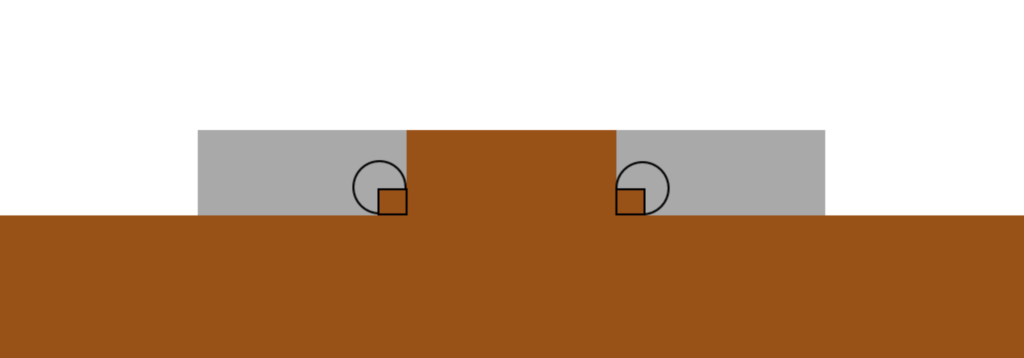
Illustration showing a tab design with rounded edges, featuring a central tab with additional shapes for visual effects. The background consists of different shades and shapes, emphasizing the tab structure.
插图展示了一个带有圆角边缘的标签设计,中心标签带有用于视觉效果的额外形状。背景由不同的阴影和形状组成,突出了标签结构。
Here’s that (again: old!) demo:
这是那个(再次强调:旧的!)演示:
Let’s Use shape() Instead
让我们改用 shape()
I’m so hyped on shape(). It’s an amazing addition to CSS, giving us a primitive that can draw, well, anything you could draw with a pen tool.
我对 shape() 感到非常兴奋。这是 CSS 的一个惊人补充,它为我们提供了一个基本图元,可以绘制,嗯,任何你能用钢笔工具绘制的东西。
In our case we’re going to use the shape() primitive with clip-path to carve a tab shape out of a rectangle. No extra elements!
在我们的例子中,我们将使用 shape() 原语结合 clip-path 从矩形中雕刻出选项卡形状。无需额外元素!
.tab {
  clip-path: shape(
    /* do commands to cut out a tab shape */
  );
}Code language: CSS (css)
The shape() function takes all these commands to do the drawing. Depending on how complex a thing you are trying to do, the syntax is fairly human-readable.
shape() 函数接收所有这些命令来进行绘制。根据你尝试做的事情的复杂程度,该语法具有相当高的人类可读性。
Let’s slowly walk through hand-building this tab shape. It’ll be extra cool because:
让我们慢慢来,一步步手动构建这个标签页形状。它会特别酷,因为:
- It’s not completely fixed shape. Parts of it can be fixed coordinates, and other parts can be flexible. You’ll see, it’s awesome.
- 它不是完全固定的形状。它的部分可以是固定坐标,而其他部分可以是灵活的。你会看到,这非常棒。
- We can variablize it, meaning we can adjust the look on the fly.
- 我们可以将其变量化,这意味着我们可以随时调整外观。
1) Starting Out!
1) 开始吧!
Elements start out as ...