
Docker lazy loading at Grab: Accelerating container startup times
At Grab, we’ve been exploring ways to dramatically reduce container startup times for our data platforms. Large container images for services like Airflow and Spark Connect were taking minutes to download, causing slow cold starts and poor auto-scaling performance. This blog post shares our journey implementing Docker image lazy loading using eStargz and Seekable OCI (SOCI) technologies, the results we achieved, and the lessons learned along the way.
Results: The numbers speak for themselves
Benchmark results
Our initial testing on fresh nodes (nodes without cached images) showed dramatic improvements in image pull times as shown in Figure 1.
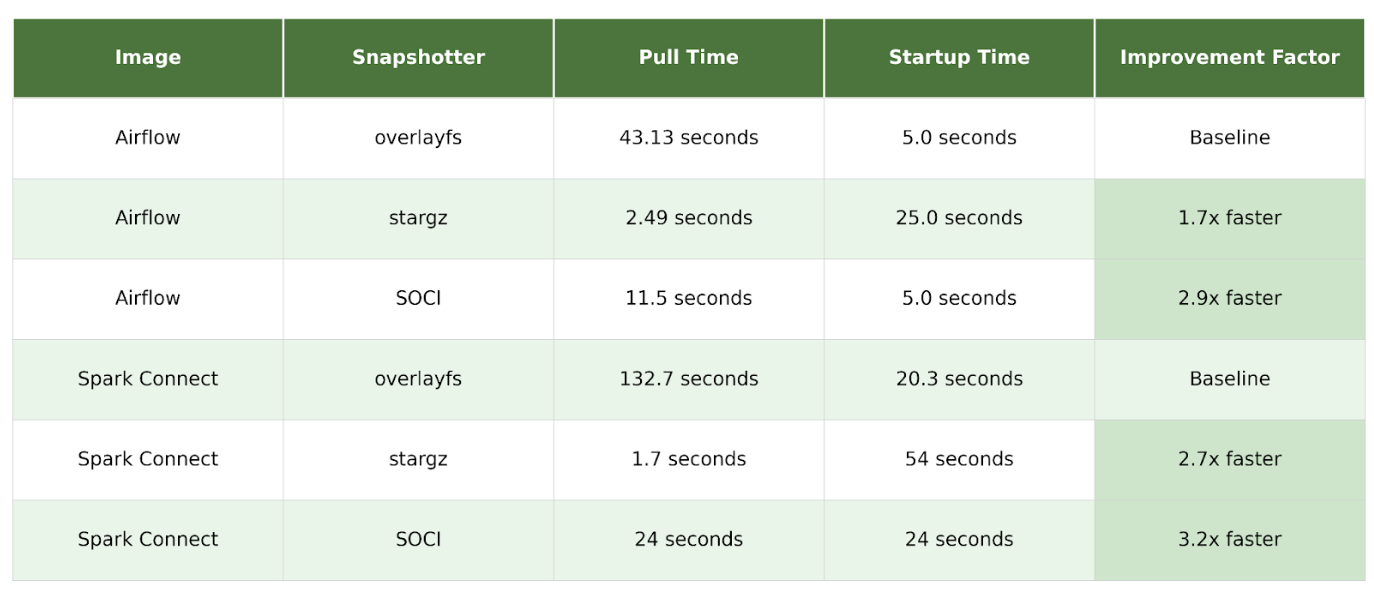
Figure 1. Table of results.
The key advantage of lazy loading is the reduction in image pull time, especially on “fresh” nodes that do not have the image cached. By analyzing detailed pod events, we can see the precise impact of using the stargz snapshotter.
During our SOCI benchmark testing, we observed an important distinction between SOCI and eStargz: SOCI maintains the same application startup time as standard images, while eStargz takes longer. For example, with Airflow, both overlayFS and SOCI achieved 5.0 seconds startup time, while eStargz took 25.0 seconds. This demonstrates that lazy loading doesn’t eliminate download time; it redistributes it. SOCI’s approach of maintaining separate indexes allows it to optimize the download-to-startup time trade-off more effectively, keeping application startup performance on par with standard images while still dramatically reducing image pull time.
Production performance
The production deployment of SOCI lazy loading has delivered significant, measurable improvements across our data platforms. Both Airflow and Spark Connect now experience 30-40% faster startup times, directly improving our ability to handle traffic spikes and scale efficiently. These improvements translate to better auto-scaling responsiveness, reduced resource waste during initialization, and improved user experience for data processing workloads. The sustained performance gains observed over time demonstrate that lazy loading is a stable, production-ready optimization that delivers consistent value.
Figure 2 and 3 illustrates the P95 startup time improvements for both services:
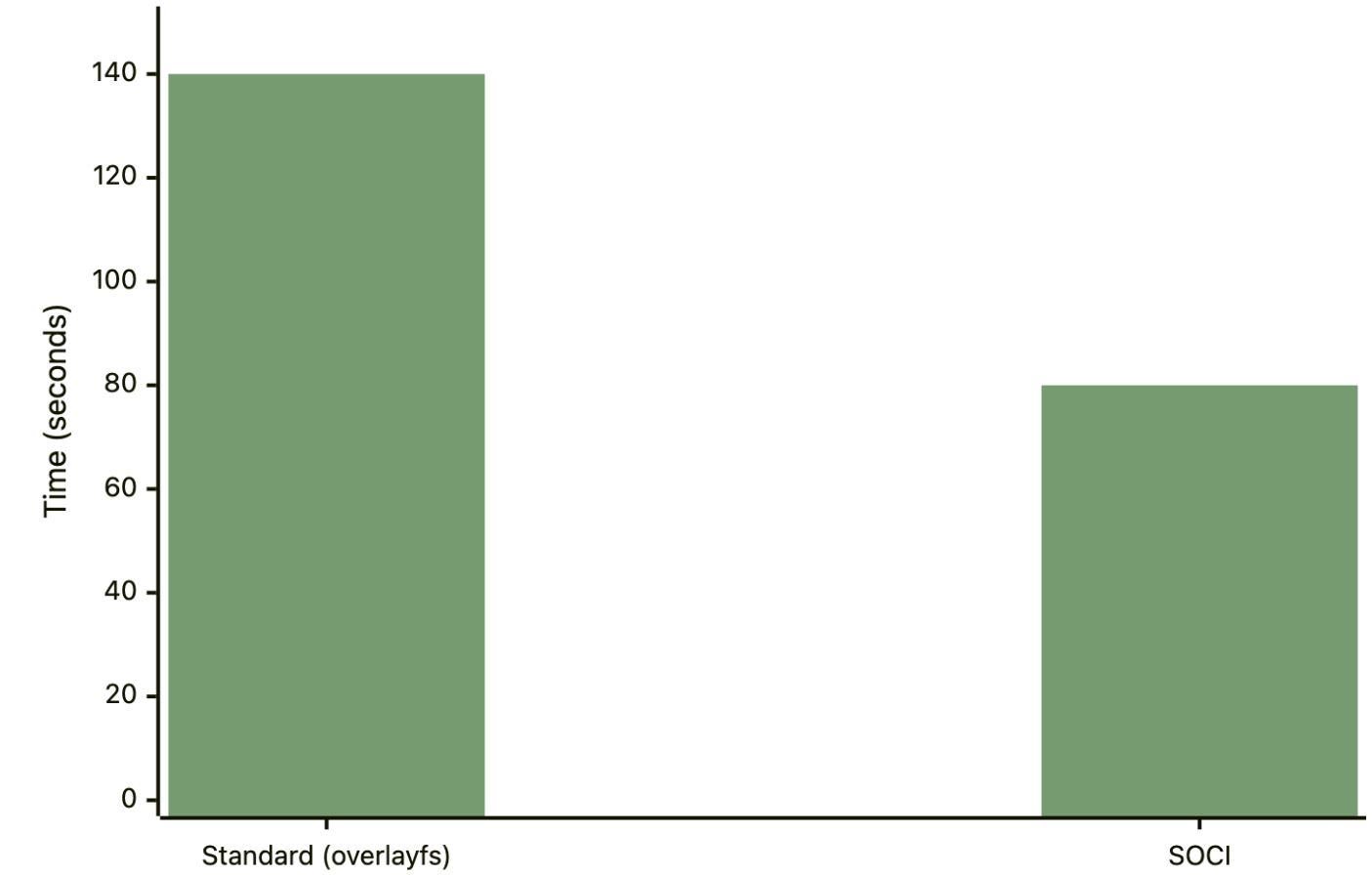
Figure 2. Production results: Airflow P95 startup time.
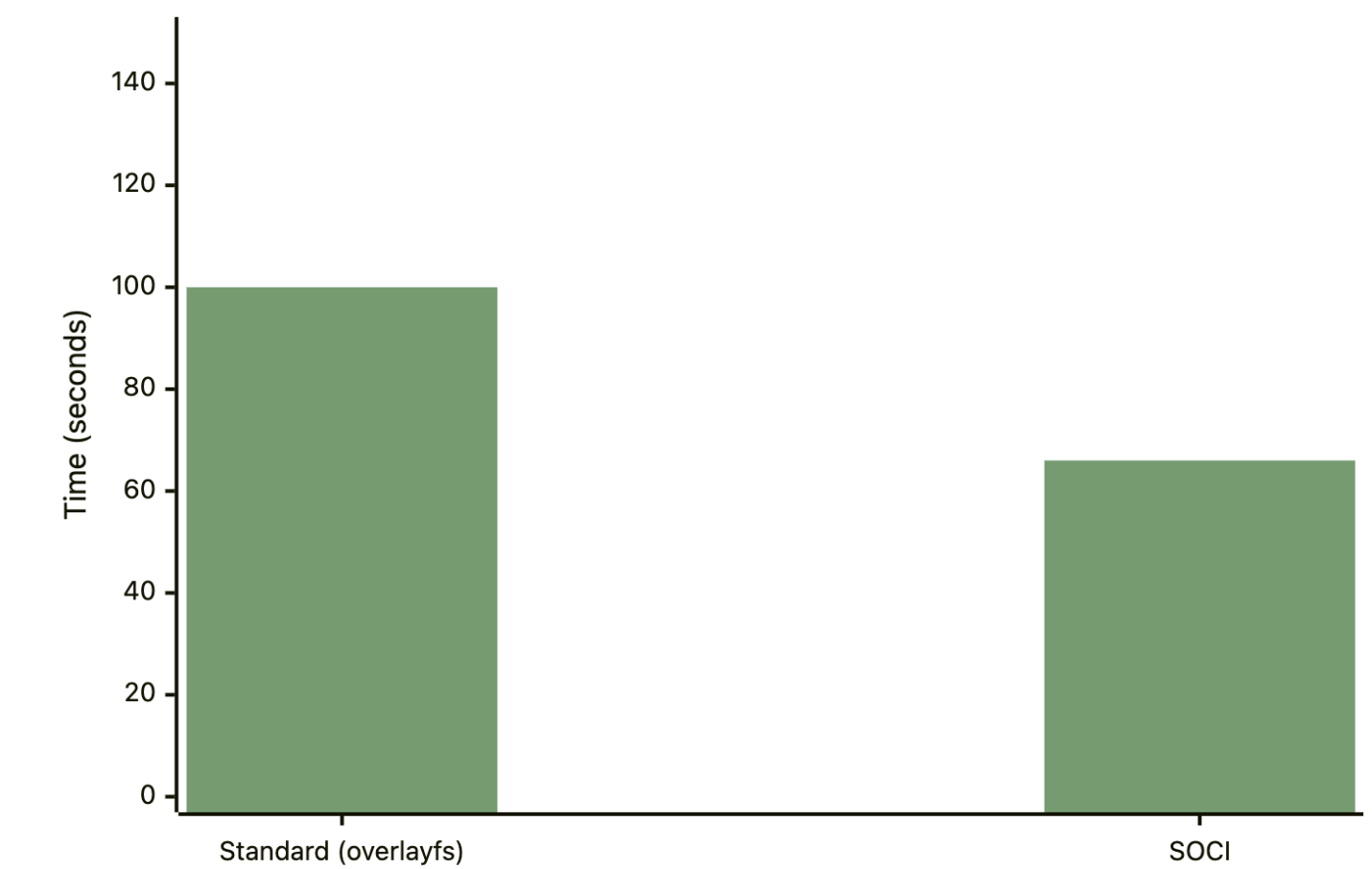
Figure 3. Production results: Spark Connect P95 startup time.
It is important to note that P95 startup time includes both the image download/pull time and the application startup time itself. This metric captures the entire system performance for both cold and hot starts on fresh and hot nodes, showing the overall system improvement rather than just cold start performance.
During the production deployment and monitoring, we gained valuable insights on SOCI configuration tuning. Following AWS’s recommended configuration from their blog on Introducing Seekable OCI: Parallel Pull Mode for Amazon EKS, we optimized our SOCI snapshotter settings:
-
Increased max_concurrent_downloads_per_image from 5 to 10.
-
Increased max_concurrent_unpacks_per_image from 3 to 10.
-
Increased concurrent_download_chunk_size from 8MB to 16MB (aligning with AWS’s recommendation for Elastic Container Registry (ECR)).
This configuration tuning led to a significant performance improvement: image download time on a fresh node was reduced from 60 seconds to 24 seconds, representing a 60% improvement. The key lesson here is that default SOCI configurations may not be optimal for all environments, and tuning these parameters based on your infrastructure (especially when using ECR) can yield substantial gains.
Technical background: How Docker lazy loading works
Container root filesystem (rootfs) and file organization
A container’s root filesystem, or rootfs, is the directory structure that the container sees as its root (/). It contains all the files and directories necessary for an application to run, including the application itself, its dependencies, system libraries, and configuration files. It’s an isolated filesystem, separate from the host machine’s filesystem.
The rootfs is built from a series of read-only layers that come from the container image. Each instruction in an image’s Dockerfile creates a new layer, representing a set of filesystem changes. When a container is launched, a new writable layer, often called the “container layer,” is added on top of the stack of read-only image layers. Any changes made to the running container, such as writing new files or modifying existing ones, are written to this writable layer. The underlying image layers remain untouched. This is known as a copy-on-write (CoW) mechanism.
In containerd, a snapshotter is a plugin responsible for managing container filesystems. Its primary job is to take the layers of an image and assemble them into a rootfs for a container. The default snapshotter in containerd is overlayFS, which uses the Linux kernel’s OverlayFS driver to efficiently stack layers. To assemble the rootfs, the overlayFS snapshotter creates a “merged” view of the read-only image layers:
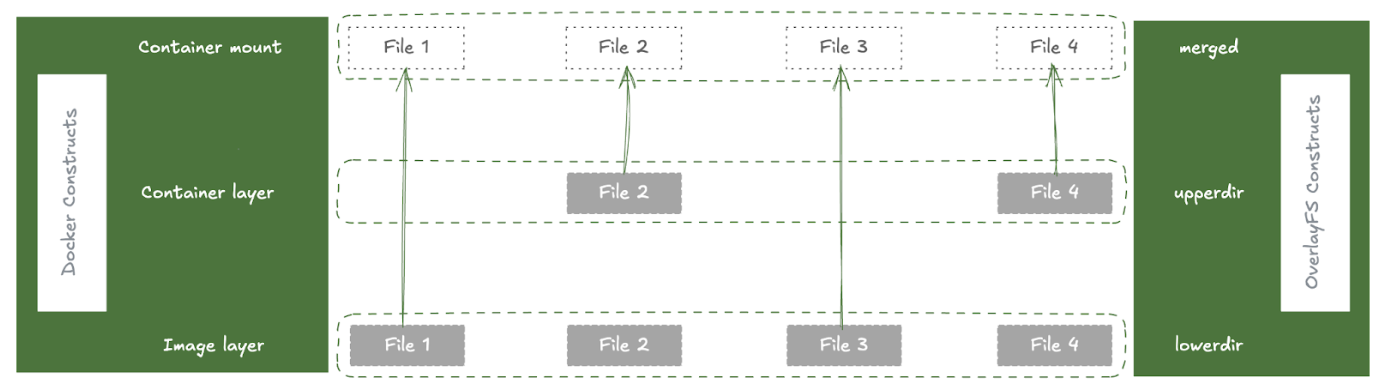
Figure 4. How OverlayFS assembles the container filesystem.
-
lowerdir: The read-only image layers are used as the lowerdir in OverlayFS. These are the immutable layers from the container image.
-
upperdir: A new, empty directory is created to be the upperdir. This is the writable layer for the container where any changes are stored.
-
merged: The merged directory is the unified view of the lowerdir and upperdir. This is what is presented to the container as its rootfs.
When a container reads a file, it’s read from the merged view. When a container writes a file, it’s written to the upperdir using a copy-on-write mechanism. This is an efficient way to manage container filesystems, as it avoids duplicating files and allows for fast container startup.
The problem: Traditional container image pull
To understand the benefits of lazy loading, we first need to understand the traditional container image pull process:
-
Download layers: The container runtime downloads all layer tarballs that make up the image.
-
Unpack layers: Each layer is unpacked and extracted onto the host’s disk.
-
Create snapshot: The snapshotter combines these layers into a single, unified filesystem, known as the container’s rootfs.
-
Start container: Only after all layers are downloaded and unpacked can the container start.
This process is slow, especially for large images, as the entire image must be present on the host before the container can launch.
The solution: Remote snapshotter
To address the slow startup issue with large images, we use a remote snapshotter solution. A remote snapshotter is a special type of snapshotter that doesn’t require all image data to be locally present. Instead of downloading and unpacking all the layers, it creates a “snapshot” that points to the remote location of the data (like a container registry). The actual file content is then fetched on-demand when the container tries to read a file for the first time.
While a traditional snapshotter like overlayFS uses directories on the local disk as its lowerdir, a remote snapshotter creates a virtual lowerdir that is backed by the remote registry. This is typically done using FUSE (Filesystem in Userspace). The remote snapshotter creates a FUSE filesystem that presents the contents of the remote layer as if it were a local directory. This FUSE mount is then used as the lowerdir for the overlayFS driver. This allows the remote snapshotter to integrate with the existing overlayFS infrastructure while adding the capability of lazy-loading data from a remote source.
There are two main formats that enable remote snapshotters: eStargz and SOCI.
eStargz format
eStargz is a backward-compatible extension of the standard OCI tar.gz layer format. It has several key features that enable lazy loading:
-
Individually compressed files: Each file within the layer (and even chunks of large files) is compressed individually. This is the key that allows for random access to file contents.
-
TOC (table of contents): A JSON file named
stargz.index.jsonis located at the end of the layer. This TOC contains metadata for every file, including its name, size, and, most importantly, its offset within the layer blob. -
Footer: A small footer at the very end of the layer contains the offset of the TOC, allowing it to be easily located by reading only the last few bytes of the layer.
-
Chunking and verification: Large files can be broken down into smaller chunks, each with its own entry in the TOC. Each chunk also has a chunkDigest in its TOC entry, allowing for independent verification of each downloaded piece of data.
-
Prefetch landmark: A special file,
.prefetch.landmark, can be placed in the layer to mark the end of “prioritized files”. This allows the snapshotter to intelligently prefetch the most important files for the container’s workload.
The stargz snapshotter uses the eStargz format to enable lazy loading. Here’s how it works:
-
Mount request: When containerd calls the Mount function, it’s the main entry point for creating a new filesystem for a layer.
-
Resolve and read TOC: The snapshotter fetches the layer’s footer, then fetches the
stargz.index.jsonTOC from the remote registry. This TOC contains all the file metadata needed to create a virtual filesystem. -
Mount FUSE filesystem: With the TOC in memory, the snapshotter creates a virtual filesystem using FUSE. The container can now start, as it has a valid rootfs, even though most of the file content has not been downloaded.
-
On-demand fetching: When the container performs a file operation like
read(), the FUSE filesystem intercepts the call. The snapshotter checks a local disk cache for the requested bytes. If the data is not cached, it issues an HTTP Range request to the container registry to download only the required chunk of the layer. -
Remote fetching and caching: The downloaded data is returned to the container and also written to the local cache for subsequent reads.
-
Prefetching for optimization: After the FUSE filesystem is mounted, a background goroutine begins downloading the prioritized files (up to the .prefetch.landmark) and can also be configured to download the entire rest of the layer in the background.
For a deeper understanding of the eStargz format and stargz snapshotter, see the stargz-snapshotter overview documentation.
SOCI format
SOCI is a technology open sourced by AWS that enables containers to launch faster by lazily loading the container image. SOCI works by creating an index (SOCI Index) of the files within an existing container image. SOCI borrows some of the design principles from stargz-snapshotter but takes a different approach:
-
Separate index: A SOCI index is generated separately from the container image and is stored in the registry as an OCI Artifact, linked back to the container image by OCI Reference Types.
-
No image conversion: This means that the container images do not need to be converted, image digests do not change, and image signatures remain valid.
-
Native Bottlerocket support: SOCI is natively supported on Bottlerocket OS.
For a deeper understanding of the SOCI format, see the soci-snapshotter documentation.
Building and deploying lazy-loaded images
Setting up snapshotters in EKS
When using EKS with containerd as the container runtime, you can configure remote snapshotters to enable lazy loading. Here’s how to set them up:
For stargz-snapshotter (eStargz): You need to install the containerd-stargz-grpc service first, then register it as a proxy plugin in containerd’s configuration:
# /etc/containerd/config.toml
[proxy_plugins]
[proxy_plugins.stargz]
type = "snapshot"
address = "/run/containerd-stargz-grpc/containerd-stargz-grpc.sock"
For detailed installation instructions, see the stargz-snapshotter installation documentation. The setup can be baked into an AMI for production use or tested via user data from node bootstrap scripts.
For SOCI snapshotter (Bottlerocket): On Bottlerocket nodes, enable the SOCI snapshotter via user data:
# Enable SOCI snapshotter
[settings.container-runtime]
snapshotter = "soci"
SOCI is natively supported on Bottlerocket, so no additional daemon installation is required.
Building lazy-loaded images
eStargz images can be built natively using Docker Buildx by setting the output compression to estargz:
docker buildx build --platform linux/amd64 --output type=registry,oci-mediatypes=true,compression=estargz,force-compression=true --tag $ECR_REGISTRY/airflow:$TAG .
SOCI doesn’t require rebuilding images; you only need to generate a SOCI index for existing images. Since Docker doesn’t natively support SOCI index generation yet, workaround solutions include using the AWS SOCI Index Builder Using Lambda Functions or integrating SOCI index generation into your CI/CD pipeline as described in this blog post.
Key takeaway: Why we chose SOCI
We started our exploration with eStargz but ultimately chose SOCI for production deployment. The key reason is scalability and alignment with our strategy to use Bottlerocket OS for enhancing Kubernetes pod startup and security. SOCI is natively supported by Bottlerocket, which means service teams don’t need to set up and maintain the more complicated stargz snapshotter across all EKS clusters. This makes the implementation easier to maintain and provides better support from AWS.
Additionally, we learned that lazy loading doesn’t eliminate the time required to download image data; it redistributes it from startup time to runtime. While this dramatically improves cold start performance, it’s important to monitor application performance closely and tune configuration parameters based on your workload and infrastructure. We achieved a 60% improvement by optimizing SOCI’s parallel pull mode settings, demonstrating the value of proper configuration tuning.
Conclusion
Docker image lazy loading with SOCI offers a significant opportunity to improve the performance and efficiency of our services at Grab. Our testing and production deployments have shown:
-
4x faster image pull times on fresh nodes.
-
29-34% improvement in P95 startup times for production workloads.
-
60% improvement in image download times with proper configuration tuning.
The implementation path is clear, low-risk, and builds on proven components. This technology is production-ready, and we’re continuing to scale it across more services.
References
Join us
Grab is a leading superapp in Southeast Asia, operating across the deliveries, mobility and digital financial services sectors. Serving over 800 cities in eight Southeast Asian countries, Grab enables millions of people everyday to order food or groceries, send packages, hail a ride or taxi, pay for online purchases or access services such as lending and insurance, all through a single app. Grab was founded in 2012 with the mission to drive Southeast Asia forward by creating economic empowerment for everyone. Grab strives to serve a triple bottom line – we aim to simultaneously deliver financial performance for our shareholders and have a positive social impact, which includes economic empowerment for millions of people in the region, while mitigating our environmental footprint.
Powered by technology and driven by heart, our mission is to drive Southeast Asia forward by creating economic empowerment for everyone. If this mission speaks to you, join our team today!