
Record, generate, run: AI-powered UI test generation for iOS
Introduction
In our recent AutoTrack SDK blog post, we shared how we solved the challenge of capturing complete user journeys across our mobile app. One of the most promising applications we highlighted was automating iOS UI (User Interface) test case generation using the rich interaction data to automatically create test scripts that mimic real-world usage patterns.
Our vision has become a reality with the development of the Mobile UI Testing AI Workflow for iOS. This system lets developers record their interactions with the app and, within minutes, receive complete, executable UI test code. This code includes essential components such as mocks, feature flags, and analytics verification. In this post, we will explore how we brought this system to life, the architecture we selected, and the valuable lessons we learned throughout the process.
The problem: UI tests are expensive to write
Writing UI tests manually is time-consuming and repetitive. Developers typically spend days:
- Writing test code line by line.
- Creating mock data and API responses.
- Configuring feature flags and test environments.
- Maintaining tests when the UI changes.
Even more concerning is that this effort often leads to incomplete coverage. Teams prioritise critical flows and leave edge cases untested. When bugs surface in production, reproducing them requires piecing together user journeys from fragmented data, which is exactly the problem AutoTrack was designed to solve.
This prompts us to ask: What if we could turn AutoTrack’s recorded user journeys directly into UI tests?
The solution: From recording to an automatically AI-Generated test
The core idea is simple: Record what you do → AI writes the test code → Run your tests.
Instead of manually instrumenting every tap and swipe, developers interact with the app on a simulator while a Test recorder captures their actions. An AI assistant then analyses the recording and generates:
- Test files: Xcode test-based UI test code that replays the recorded flow.
- API mocks: Simulated backend responses based on network requests captured during recording.
- Feature flag configuration: Exact feature flag state from the recording session.
- Analytics expectations: Verification that expected events are triggered during the test.
All of this is generated in the correct directories and formats, ready to run against the existing test infrastructure.
How we built it: Architecture overview
The workflow combines four main components:
1. Test recorder (simple proxy server)
A simple proxy that runs locally during recording. It captures all API requests and responses as the developer interacts with the app, and exposes this data for the AI to use when generating mocks.
2. AI-Powered code generation
We use an AI-assisted development environment with a custom workflow prompt. The prompt instructs the AI to:
- Reset the recorder before each recording session.
- Fetch and analyse the recorded flow data.
- Generate Swift test code following our project’s conventions.
- Create mock expectation classes for captured API calls.
- Produce feature flag configuration files.
- Add analytics event expectations where applicable.
The AI comprehends our test structure, including the “Given-When-Then” organization, base test classes, and helper utilities, ensuring that the generated code integrates seamlessly into the existing codebase.
3. Test execution infrastructure
Generated tests run against our existing UI test stack:
- Local server: Mocks API responses during UI test execution.
- Instrumentation server: Validates that expected analytics events are triggered during test runs.
- Build system: Compiles and organises the iOS project.
No new infrastructure was required as we designed the workflow to plug into what we already have.
4. Developer workflow integration
The workflow is designed to fit into a developer’s normal flow:
- Setup: Start the recorder and required services (one-time or per session).
- Record: Interact with the app on a simulator while the recorder captures actions.
- Generate: Ask the AI to generate the test; it fetches recording data and produces the files.
- Verify: Review the generated code, run the test locally, and iterate.
The entire cycle from “I want to test this flow” to “I have a passing test” typically takes 10–20 minutes, compared to days for manual test writing.
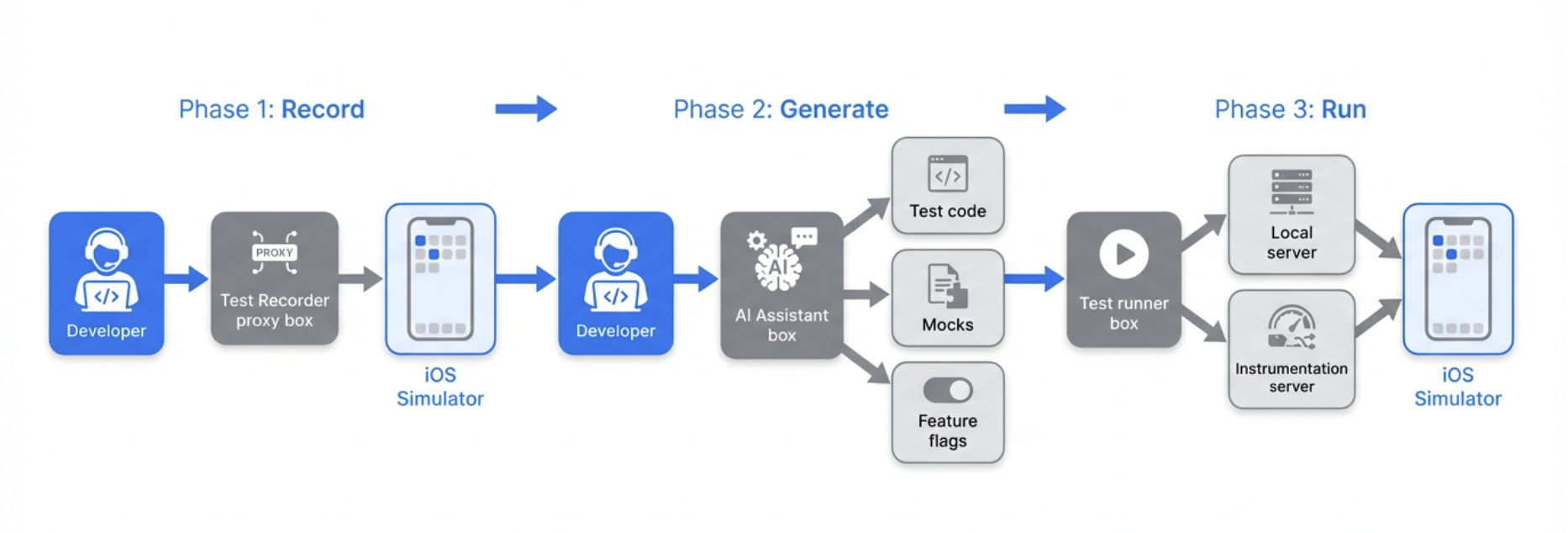
Figure 1. Developer testing workflow.
What gets generated
The AI produces exactly three linked files per test:
| File | Purpose |
|---|---|
| Test expectations | Mocks all network API requests captured during recording with JSON response bodies |
| Feature flags | Recreates the exact feature flag state from the recording session |
| UI test class | Complete test that replays the recorded user flow with analytics validation |
The files are placed in the correct directories for our project structure and use our standard base classes and helpers.
The AI also uses an AIUITestUtils (Common AI Utilities functions) helper that supports:
- Coordinate-based tapping: When accessibility IDs are unavailable, taps use recorded coordinates.
- Swipe gestures: Pan and scroll interactions.
- Keyboard input: Text entry for search fields and forms.
Example: API Mock (JSON response)
When the Test Recorder captures an API call during your session, the AI generates mock data from the actual response. Here’s a simplified template of the structure:
{
  "endpoint": "/api/v1/example-resource",
  "method": "GET",
  "statusCode": 200,
  "response": {
    "items": [
      {
        "id": "item-001",
        "title": "Example Item",
        "metadata": {}
      }
    ]
  }
}
{
  "steps": [
    {
      "action": "tap",
      "timestamp": "2025-01-15T10:30:01.000Z",
      "element": {
        "accessibilityId": "button_primary",
        "screenName": "home"
      }
    },
    {
      "action": "type",
      "timestamp": "2025-01-15T10:30:02.500Z",
      "text": "sample input",
      "element": {
        "accessibilityId": "input_field",
        "screenName": "form"
      }
    },
    {
      "action": "swipe",
      "timestamp": "2025-01-15T10:30:05.000Z",
      "direction": "up",
      "element": {
        "accessibilityId": "scroll_view",
        "screenName": "list"
      }
    }
  ]
}
Example: Generated test structure
func testSearchFlow() {
    // GIVEN: Backend expectations (mocks from recording)
    let expectations = SearchTestExpectations()
    composer.setupExpectations(factories: [expectations])

    // WHEN: Launch app and execute recorded flow
    let app = launchApp(featureFlags: SearchFeatureFlags.capturedFlags)
    let utils = TestUtils(app: app)

    utils.tapElement(identifier: "searchBar")
    utils.typeText("pizza")
    utils.tapElement(identifier: "searchButton")

    // THEN: Add assertions
    let resultsList = app.tables["searchResults"]
    XCTAssertTrue(resultsList.waitForExistence(timeout: 5.0))
    XCTAssertGreaterThan(resultsList.cells.count, 0)
}
Enabling event verification
A key requirement was verifying that analytics events fire correctly during tests. We extended the workflow to support instrumentation testing. This ensures that tests validate not only on UI behaviour but also that the right analytics are emitted for product and data teams. The process of instrumentation testing is as follows:
- The instrumentation server runs locally and receives analytics events from the app during test execution.
- The AI captures expected events from the recording and adds them to the generated test.
- The test uses our event validation helper to assert that all expected events are triggered within a timeout.
Lessons learned and best practices
AI generates a starting point, not production-ready tests
The AI produces sample code that demonstrates mocking patterns, user interactions, and element identification. Developers are required to:
- Add UI assertions: The AI often leaves assertion sections empty; you need to verify expected outcomes.
- Replace
Thread.sleep(): Generated code may include fixed delays; these should be replaced withwaitForExistence()to avoid flakiness. - Improve element identification: When accessibility IDs are missing, the AI falls back to coordinates; adding proper IDs in the app improves reliability.
- Validate locally: Run tests multiple times (5–10 runs) before pushing to CI to catch flakiness.
These practices have been documented to ensure teams know exactly what to review before committing their code.
Recording quality matters
Clean recordings produce better tests. We recommend these best practices:
- Record one flow at a time: Avoid mixing multiple flows in a single session.
- Proceed deliberately: Allow screens to load fully before interacting; unintentional clicks get recorded.
- Use two simulators: One for recording (including login), one for running tests, since the login state can reset between runs.
- Configure feature flags beforehand: Set flags on the experiment portal before recording so mocks match the intended state.
The human-in-the-loop is essential
We explicitly advise against pushing AI-generated tests directly to CI. The workflow accelerates test creation. However, human review ensures:
- Assertions are meaningful.
- Tests are not flaky.
- Code follows team standards.
- Edge cases and error scenarios are covered.
Key takeaways
As we reflect on our journey, several critical insights have emerged:
- Leverage AutoTrack’s data: User journey recordings are rich enough to drive automated test generation when combined with the right tooling and prompts.
- Streamlined workflow: The “Record → Generate → Review” process significantly reduces the need for manual coding, though human oversight remains essential to ensure quality and reliability.
- Integration with existing systems: By aligning with our current testing infrastructure, like the local API mocking server, instrumentation server, and build system, we avoided the need to develop new systems, thereby speeding up adoption.
- Establish clear guidelines: Providing explicit instructions on what to add, replace, and validate ensures that teams can utilize AI-generated tests safely and effectively.
In conclusion, the Mobile UI Testing AI Workflow is now available to our iOS teams, enhancing our testing capabilities and efficiency.
Join us
Grab is a leading superapp in Southeast Asia, operating across the deliveries, mobility, and digital financial services sectors, serving over 900 cities in eight Southeast Asian countries: Cambodia, Indonesia, Malaysia, Myanmar, the Philippines, Singapore, Thailand, and Vietnam. Grab enables millions of people every day to order food or groceries, send packages, hail a ride or taxi, pay for online purchases or access services such as lending and insurance, all through a single app. We operate supermarkets in Malaysia under Jaya Grocer and Everrise, which enables us to bring the convenience of on-demand grocery delivery to more consumers in the country. As part of our financial services offerings, we also provide digital banking services through GXS Bank in Singapore and GXBank in Malaysia. Grab was founded in 2012 with the mission to drive Southeast Asia forward by creating economic empowerment for everyone. Grab strives to serve a triple bottom line. We aim to simultaneously deliver financial performance for our shareholders and have a positive social impact, which includes economic empowerment for millions of people in the region, while mitigating our environmental footprint.
Powered by technology and driven by heart, our mission is to drive Southeast Asia forward by creating economic empowerment for everyone. If this mission speaks to you, join our team today!