
A Practical Guide To Loop Engineering Without Yourself
[

A Practical Guide To Loop Engineering Without Yourself
There's a lot of talk right now about "designing loops" instead of prompting your coding agent. If you spend time researching what a loop actually is, you'll find one of the clearest technical breakdowns in the loop-engineering framework
Loop engineering is the practice of replacing manual prompting with autonomous control systems. Instead of repeatedly prompting an agent to perform micro-tasks, you design a system that discovers work, executes it, and verifies progress over time
The core philosophy: the leverage point has moved from crafting individual prompts to designing the orchestration systems that manage agents. This eliminates three specific problems - Intent Debt (instructions decaying over time), Comprehension Debt (re-contextualizing an agent for every task), and Cognitive Surrender (blindly accepting agent output without structured verification)
Getting Started
Before running an autonomous agent, you need to assess the "Comprehension Debt" of your repository. The framework provides three CLI tools via npx to manage the loop lifecycle.
loop-audit scans your project and computes a Readiness Score from L0 to L3 by detecting signals like STATE.md files, MCP configurations, and verifier skills
loop-init scaffolds skills, state files, and observability docs for a specific pattern, supporting tools like Grok, Claude, Codex, and Opencode
loop-cost estimates monthly token budgets based on cadence and readiness level
The recommended entry point for any project is Daily Triage at L1 (Report-only) first. In this mode, the loop identifies issues and updates state without modifying any code. You run the initializer, the tool creates a STATE.md file that acts as the durable spine of the loop, and then you establish a cadence using a command like /loop 1d Run loop-triage. Update STATE.md. No auto-fix in week one
Core Concepts and Vocabulary
A loop is a recursive goal execution cycle. Unlike a chat session where a human provides a prompt and gets a response, a loop discovers its own work, executes it, verifies the results, and persists memory across sessions.
The recursive goal cycle follows six steps: Schedule (the heartbeat triggers the run), Triage (a specialized skill scans for new work), State Sync (reads and updates STATE.md), Execute (actions performed in isolated worktrees), Verify (a separate Checker agent validates the Maker agent's work), and Gate (high-risk actions pause for human approval).
Readiness is categorized into four levels:

Key vocabulary includes Intent Debt (the gap between project conventions and an agent's default cold-start behavior), Comprehension Debt (losing understanding of your own codebase as loop-generated PRs pile up), Cognitive Surrender (letting the loop run without engineering judgment), Orchestration Tax (the mechanical overhead of managing parallel agents), and the Maker/Checker Split (the rule that the agent writing code must never be the one approving it)
The Six Primitives
Every loop is built from six fundamental building blocks:
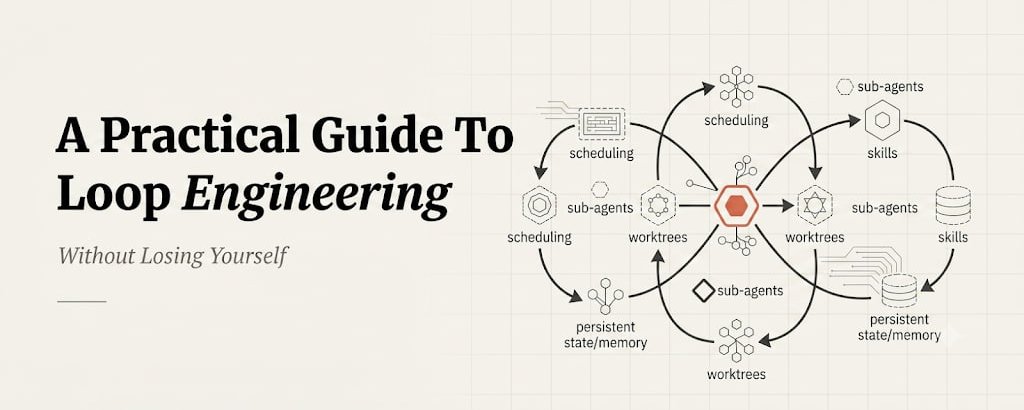
- Scheduling - /loop, cron, or GitHub Actions trigger the discovery and triage cycle
- Worktrees - git worktree provides isolated environments for safe parallel work
- Skills - SKILL.md files encapsulate intent and logic for the agent
- Connectors - MCP (Model Context Protocol) interfaces for GitHub, Slack, or Linear
- Sub-agents - the Maker/Checker split separates implementation from verification
- State - STATE.md and loop-run-log.md provide durable memory outside the context window
Patterns
The registry contains seven core, production-ready patterns, each with a defined goal, cadence, and risk level:
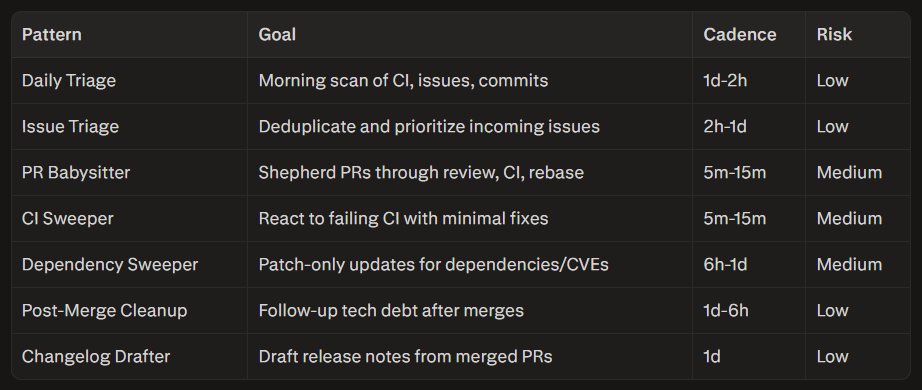
Choosing a pattern depends on your pain point: CI red points to CI Sweeper, stalling PRs point to PR Babysitter, and morning chaos points to Daily Triage. Coordination rules also matter when running multiple patterns - for example, CI Sweeper owns failing checks so PR Babysitter doesn't re-fix the same branch within the same hour
Starters and Examples
The repository provides copy-and-run scaffolds for various readiness levels. Minimal Loop Starters (L1) focus on Daily Triage and are available for Grok, Claude, Codex, and Opencode, each with tool-specific directory structures.
For teams ready to graduate to automated fixes, L2 Assisted Patterns include PR Babysitter, CI Sweeper, Dependency Sweeper, Post-Merge Cleanup, and Changelog Drafter - all with multi-tool skills and defined state schemas for tracking attempts and failures. The recommended workflow is: initialize with loop-init, audit with loop-audit, then reference the patterns directory to understand the goals and risks
CLI Tooling
The full CLI suite guides engineers through the loop lifecycle. loop-audit computes a Loop Readiness Score from 0-100, detecting over 15 signals and returning a CI exit code below 40 to function as a quality gate. loop-init scaffolds the boilerplate. loop-cost estimates daily and monthly token costs. loop-sync detects drift between intended configuration and actual state, while loop-context acts as a stateful memory manager and circuit breaker, triggering a break if stagnation or budget limits are reached. Two advanced tools round out the suite: goal-audit for /goal workflow readiness, and loop-mcp-server, which exposes loop patterns as queryable MCP resources
Safety, Operations and Observability
Safety is enforced through path denylists, restricted connector scopes, and machine-readable constraints. Loops must never auto-edit sensitive files such as .env, auth/, or payments/. The default auto-merge policy is none - auto-merge is only permitted for trivial, allowlisted paths like documentation typos.
Observability relies on three primitives: Token Budgeting via loop-budget.md, Run Logging that appends every execution to loop-run-log.md, and Kill Switches that allow immediate pauses via labels like loop-pause-all.
The framework catalogs eleven named failure modes by severity. The most common include Infinite Fix Loop (caused by a weak verifier, mitigated by an attempt limit of 3), State Rot (caused by no prune step, mitigated by triage discipline), Token Burn (caused by sub-minute cadence, mitigated by daily caps), and Over-Reach (caused by no path restrictions, mitigated by a path denylist)
CI/CD and Release Infrastructure
The repository automates its own maintenance through GitHub Actions across three areas: Autonomous Operations (a Daily Triage loop maintaining the repo's own state), Quality Gates (automated audits and pattern validation on every PR), and Release Pipelines (automated NPM publishing for the CLI toolset).
The repo runs its own Daily Triage pattern as an L1 automated report loop, logging 30 days of activity history. Quality gates enforce a minimum readiness score of 58 for the reference repo and 38 for starters. Five public npm packages ship from this infrastructure - loop-audit, loop-init, loop-cost, loop-sync, and loop-context - each using OIDC-based Trusted Publishing for release authenticity
Production Stories and Community
The stories directory documents real deployments, following a standardized format: Setup, What Worked, What Broke, Metrics, and Lesson. Key lessons include:
CI Sweeper Failure - kill switches and budget caps are mandatory for high-cost loops
The Verifier Problem - LLM-as-verifier fails in domains prone to overfitting, requiring numerical checkers instead
Post-Merge Win - L1 report-only mode delivers high value with zero regression risk
Multi-Loop Collision - running multiple loops requires explicit branch coordination to avoid state corruption
Contributions center on expanding the pattern registry and sharing new production stories, with the explicit rule that every story must include at least one failure or surprise - this is an engineering reference, not a hype collection