
Superuser Gateway: Guardrails for Privileged Command Execution
One misplaced flag in a manual command running as a superuser is enough to delete a production dataset, lock out an entire organization from critical tables, or quietly remove all permissions. A single _rm -r_or recursive _chmod_ on the wrong path running as a superuser account can cause widespread disruption and require lengthy clean-up and data recovery.
Uber’s data platform relies heavily on GCS (Google Cloud StorageTM), OCI (Oracle Cloud InfrastructureTM) and Apache HDFSTM for large-scale storage and analytics. A small set of engineers occasionally need superuser access to move data, fix permissions, clean up corrupted paths, or unblock time-sensitive incidents. Those same commands can also have the largest blast radius if something goes wrong.
Superuser Gateway is a workflow and service that replaces direct superuser command execution with a reviewed, auditable path for dangerous operations. The gateway triggers peer review, runs automated validation on requested commands, verifies approvals, and then executes those commands as a superuser in a controlled, remote environment. As part of this work, we removed superuser access from individual engineers so that only the Superuser Gateway back end holds those privileges going forward. Although our first deployment targets data storage systems, the model is designed for manual superuser actions in general and can be applied to other privileged systems.
Many systems at Uber rely on a small set of owners with elevated permissions: database administrators, SREs, data platform engineers, and others who can run high-impact commands such as bulk deletes, permission rewrites, or configuration changes. These operations are often risky, and they usually happen under time pressure, which makes mistakes more likely to occur, and harder to catch in advance.
Historically, the workflow has been similar across back ends: an engineer acquires a powerful credential (for example, a superuser principal or admin token) and runs commands directly from a shell. The drawback is that once a user holds a privileged credential, there are few command-level guardrails. Audit trails may point to shared or role accounts instead of individuals, and any peer review tends to be informal or non-existent.
We targeted data platform superuser as the initial use case for Superuser Gateway because of the nature and frequency of the manual operations.
Before Superuser Gateway, the standard workflow for superuser access was that engineers could independently assume the identity of a superuser, run commands via their CLI, and then log out once they were done, as shown in Figure 1.
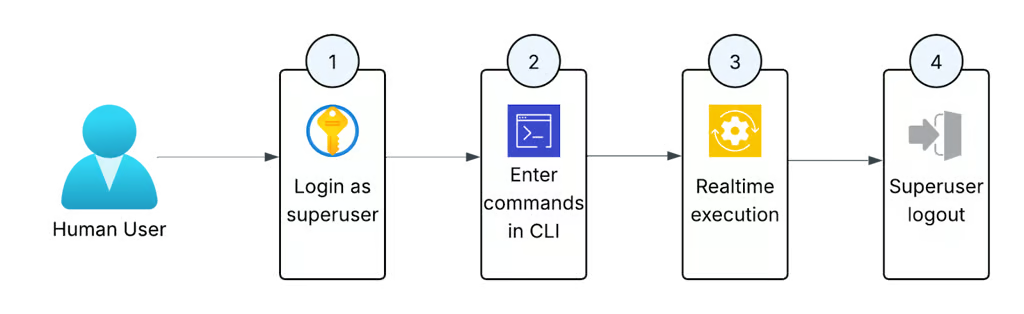
Figure 1: The old process for running privileged commands for on-call engineers.
This access pattern had several issues:
- No guardrails or oversight: a single
_hdfs dfs -rm -r_or_chmod -R_on the wrong path could create an incident. - Weak attribution because audit logs record the superuser principal, not the individual engineer who initiated the command. Full attribution required correlating the login audit logs with the command execution logs.
- Local execution means that there’s no centralized way to ensure a superuser is only being used for appropriate operations.
There was also no peer review with this process, which meant a single individual could make a mistake without any oversight from peers. At the same time, we couldn’t remove this access outright. On-call engineers need the ability to repair data issues quickly. Any replacement had to respect that operational reality.
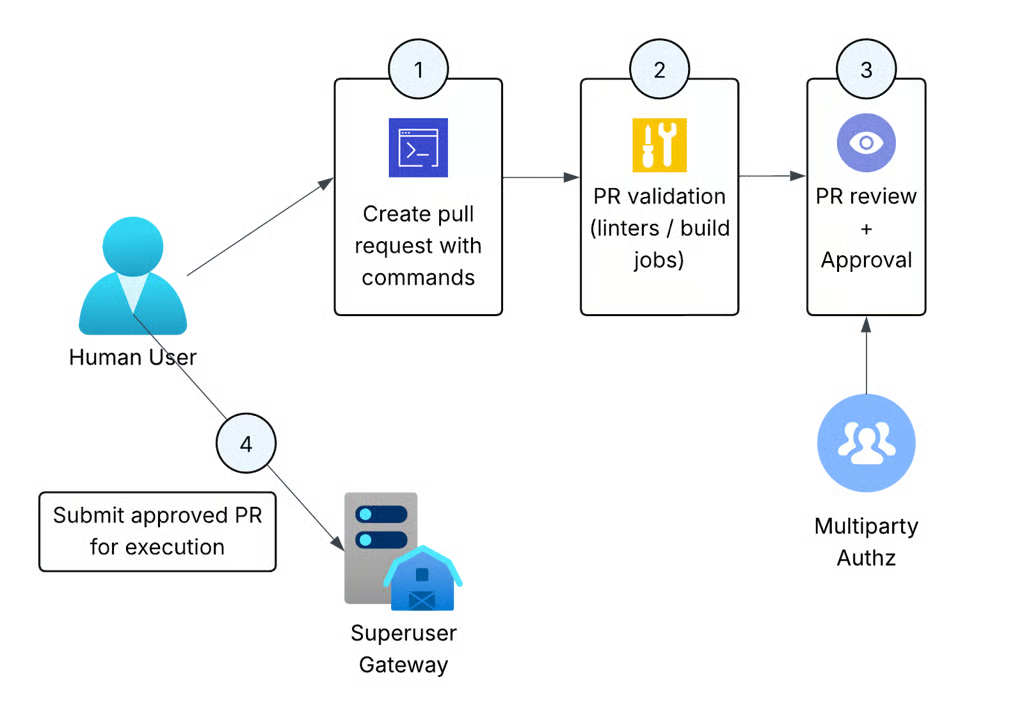
Figure 2: The new flow for executing privileged commands, which requires PR approval and remote execution by the Superuser Gateway.
With the Superuser Gateway:
- Engineers submit the commands via a CLI tool.
- Instead of executing the command, it generates a PR in a dedicated repository. Automated validation jobs execute against the PR to check for mistakes and evaluate impact.
- Another engineer reviews those commands and approves.
- A back-end service executes them as a superuser in a controlled environment.
At a high level, Superuser Gateway consists of four pieces:
- A command-line tool (
superuser-cli) that engineers use to submit superuser commands. - A Git-backed repository that stores requested commands for peer review.
- A set of CI jobs that execute automatically on these PRs.
- A back-end service that executes approved commands as superuser and streams output back to users.
Each PR passes through a mix of automated and manual validation by a peer engineer.
Automated validation includes:
- Syntax validation: checking that each line is a valid command and doesn’t contain obviously malformed input.
- Permission checks: verifying that the requesting user is allowed to perform the requested action based on internal policies.
- Impact estimation (where possible): for example, for
_rm -r_operations, a job can query filesystem images to estimate how many files would be deleted and post that information as a comment on the PR.
The Superuser Gateway back end is a service that accepts approved PRs and executes the commands and streams the results back to the user. It validates that the PR is indeed approved, that the user has the permissions to use the superuser gateway and handles authentication to the underlying services (like HDFS, GCS, and OCI).
Because the credentials and execution environment live in the service, engineers never hold superuser tickets on their local machines. This means there’s no way to circumvent the peer approval process.
From the engineer’s perspective, Superuser Gateway is a CLI-driven workflow that builds on the existing experience rather than introducing a new UI. Engineers keep writing the same HDFS commands as before, but now invoke them via superuser-cli cmd "<ORIGINAL COMMAND>", and we also support submitting scripts so they can be reviewed before execution.
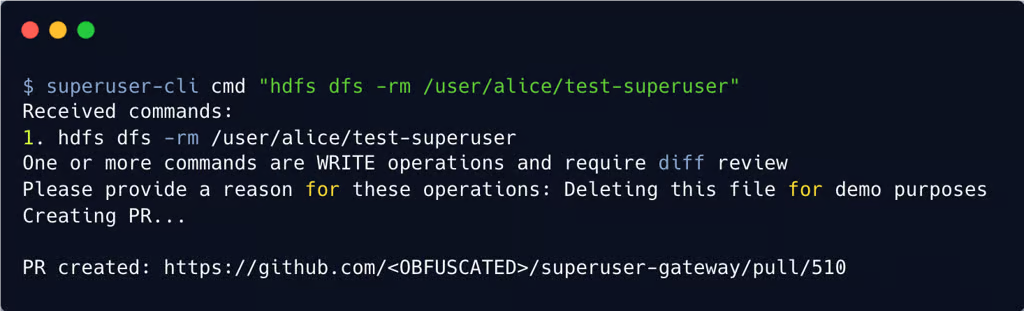
Figure 3: An example of submitting a delete command on a file and receiving the generated PR link.
Once posted for review, reviewers can review and accept the PR like any other GitHub® PR. There are also some special linters and validation jobs that run against any PR generated by the superuser gateway. The change owner can find any suitable reviewer to review their PR.
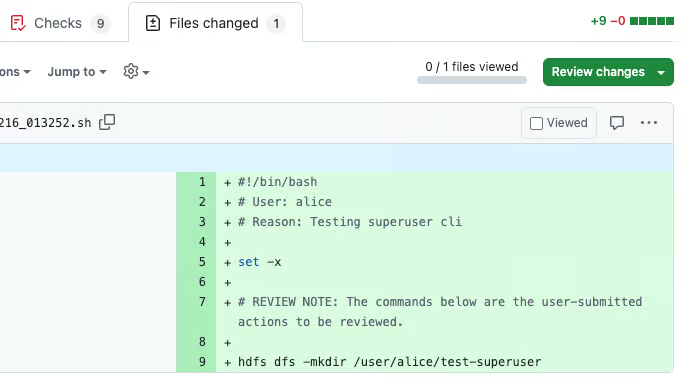
Figure 4: A sample PR sent to the reviewers.
Peer review adds some latency. For infrequent maintenance tasks, a small delay is acceptable, but for read-only debugging or investigations it can get in the way. To balance this, we scoped Superuser Gateway to risky write operations that could cause incidents, and provided a separate, lower-friction path for read-only commands that inspect data without changing system state. We are also exploring AI reviews to assist reviewers and speed up review latency.
We debated building a database-backed system for storing requests and approvals. Using a Git repository instead gave us a mature posting and review experience (comments, approvals, history). It also allowed for integration with existing CI systems (automated CI checks) and a simple way to browse past PRs and review comments.
With the success of this project for the Data Platform organization, the next thing on the roadmap is expanding support to other privileged system access at Uber. We’re also looking at deeper static analysis for commands to automatically flag likely mistakes and determine more precise impact estimates.
Privileged access is often necessary to keep large systems healthy, but it doesn’t need to come at the cost of safety. Since late 2025, all admin engineers have migrated to this flow and have collectively executed hundreds of commands via this service. Superuser Gateway gives us a repeatable way to route privileged CLI based commands through peer review and automated checks, while still letting engineers do the operational work their systems require. Consider your own organization: how often do engineers run dangerous commands during normal operations? If that thought makes you uncomfortable, you should take inspiration from us and build a Superuser Gateway!
We’d like to thank our engineering leadership at Uber: Mohammad Islam, Ajit Panda and Sean Tout.
Cover Photo Attribution: “fence“ by psiaki is licensed under CC BY 2.0.
Apache Hadoop and Apache HDFS™ are either registered trademarks or trademarks of The Apache Software Foundation in the United States and other countries.
GitHub® and its associated logos are registered trademarks of GitHub, Inc.
Google Cloud Storage™ is a trademark of Google LLC and this blog post is not endorsed by or affiliated with Google in any way.
Oracle®, Oracle Cloud Infrastructure, OCI are registered trademarks of Oracle and/or its affiliates. This blog post is not endorsed by or affiliated with Oracle in any way.
Stay up to date with the latest from Uber Engineering—follow us on LinkedIn for our newest blog posts and insights.