
How to actually master loop engineering
[


How to actually master loop engineering
Everyone on your timeline is suddenly talking about loop engineering, but almost no one is explaining how to actually build and use one.
People think they are building autonomous AI. In reality, they just traded writing code for babysitting a chat window. you type a command, the agent guesses, you paste the error log, the agent guesses again. You aren't an AI engineer. you are a manual prompter stuck in an endless back-and-forth.
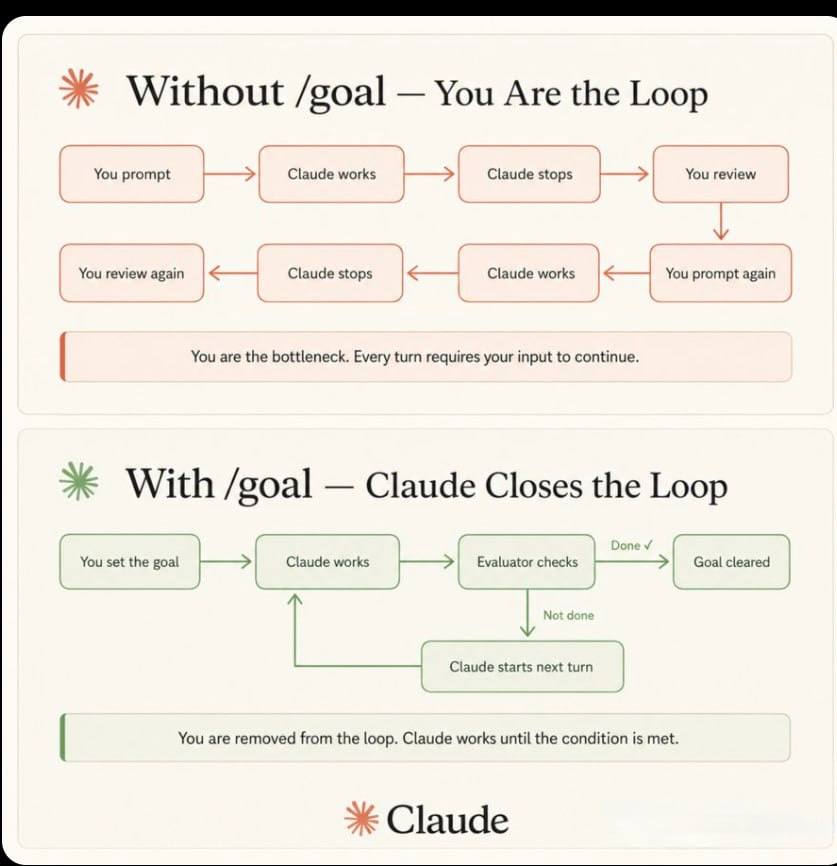
True leverage isn't knowing how to talk to a model. It is building the invisible architecture that talks to the model for you. If you don't have persistent state files, automated verifiers, and background schedules - you don't have a loop.
We are splitting this into four phases:
- The Audit: What is a Loop (And Why Was It Created?)
- The Anatomy: The 5 core building blocks of agentic architecture.
- The Build: Shipping the smallest viable loop without burning your API budget.
- The Scale: Standard patterns and quick-start commands to deploy in 5 minutes.
*Part 1: What is a Loo*****p (And Why Was It Created?)****
At its core, loop engineering is the practice of designing a self-correcting AI agent system that can recursively iterate until a specific goal is met.
Before loops, if an AI agent failed to give you what you wanted, you had to manually check the output and write a new prompt to fix it. Loop engineering completely eliminates this manual reprompting process. It replaces the endless back-and-forth chat with an automated, background cycle.
Top engineers are already changing how they work to match this reality. Boris Cherny, the creator of Claude Code, recently summarized this shift perfectly:
"I don't use prompts anymore. I use loops to prompt and Claude to figure out what to do."
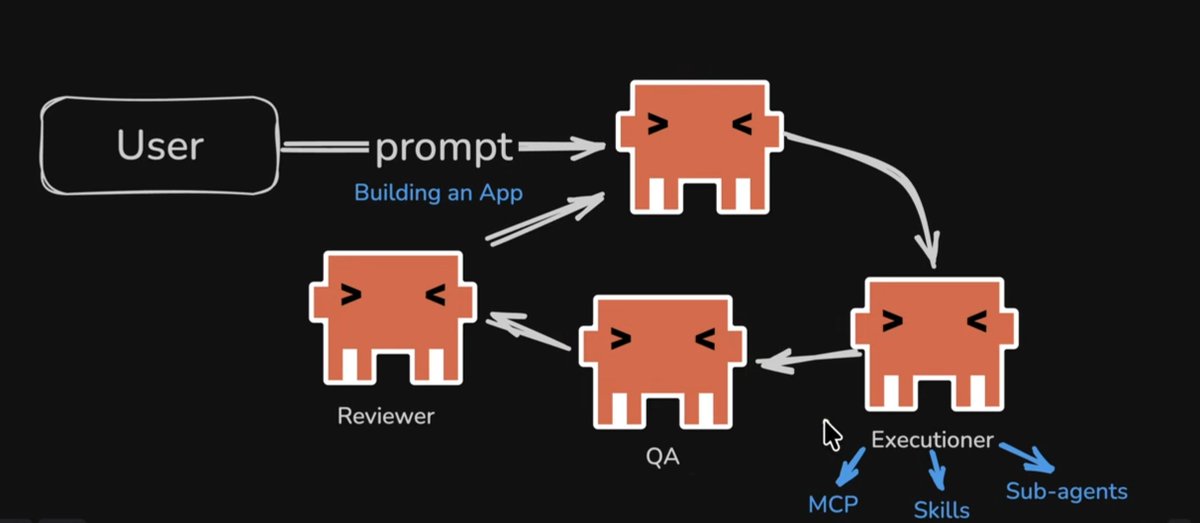
As we can see in the screenshot, here is a diagram of exactly how a loop works. A true loop relies on a multi-agent architecture to make this happen:
- The User Input: The process starts with a single, high-level prompt, such as "Building an App".
- The Orchestrator: Instead of doing the work itself, this main agent dispatches the task.
- The Executioner: This agent is spun up to handle the actual building. It triggers sub-agents and connects to external tools via MCP (Model Context Protocol) and predefined skills.
- QA & Reviewer: Once the execution is done, the work is passed to specialized QA and Reviewer agents to test and check the results against the initial conditions.
- The Self-Correcting Cycle: If the output doesn't match the goal, the orchestrator passes the feedback to a new sub-agent for execution, and the loop spins again until the result is approved.
You might wonder why we need multiple agents instead of just one doing everything. The answer is simple: having a single agent build the code and review it is like having a student finish an exam and mark their own paper. You will not get the highest accuracy. You need specialized agents with specific skills to properly review and execute the work.
Part 2: The Anatomy (The 5 Primitives + State)
If you want to build a self-correcting system, you cannot just wrap an API call in a loop and hope for the best. To build a loop that scales, you must implement the five core primitives of loop engineering:
- 1. Scheduling (The Heartbeat): Without a scheduler, you just have a one-off agent run. You need robust triggers whether that is a GitHub Action, a daily cron job, or a verifiable /goal command that dictate exactly when the loop wakes up and executes
A loop needs a strict stop condition, not just the agent feeling like it's done. Here is what a verifiable goal looks like in practice:
> /goal All tests pass and lint is clean.
  Triage failures, draft fixes, repeat until the goal holds.
- 2. Worktrees (Parallelism Without Chaos): When two agents edit the same files at the same time, you get merge hell. Git worktrees give each sub-agent its own isolated working directory. They share history but not the working tree, allowing the loop to process complex tasks safely.
- 3. Skills (The Memory of Intent): An agent needs to know your specific project conventions. A skill (often a SKILL.md file) encodes build commands, domain knowledge, and rules like "we don't do it this way because of X incident." Without skills, the loop suffers from "intent debt," forcing it to re-derive everything from scratch on every run.
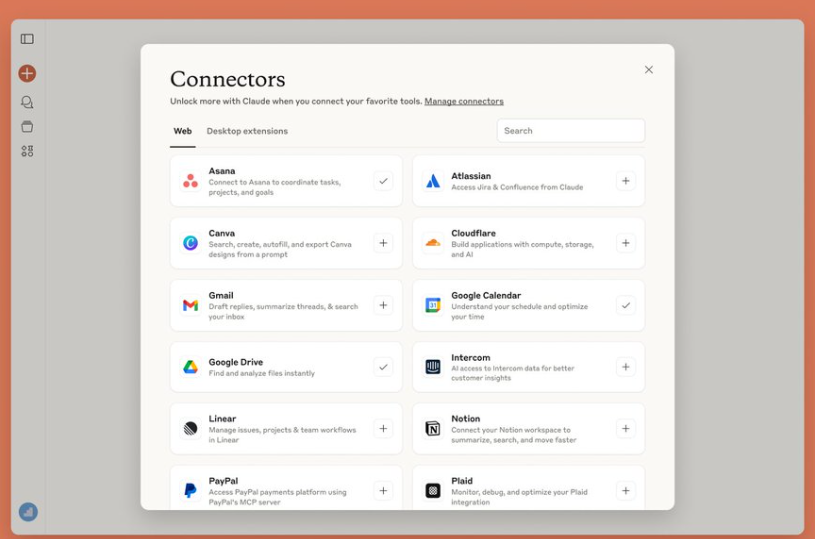
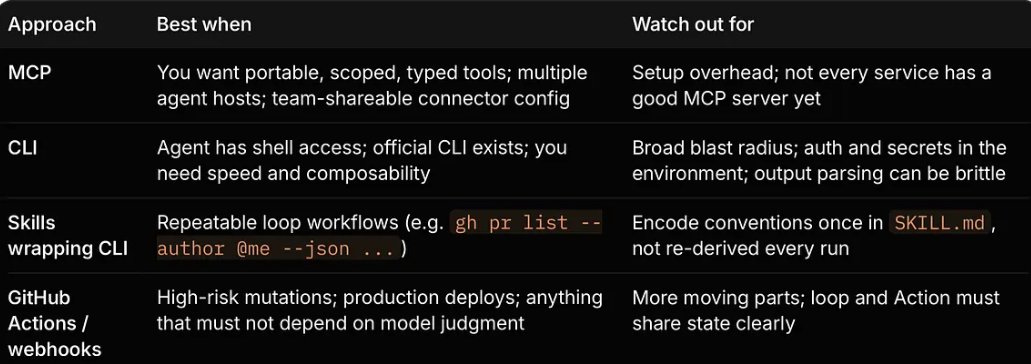
- 4. Connectors & Plugins (From Commentator to Operator): A loop that can only read the local filesystem is a loop that can only suggest. Connectors let the loop **act-**open PRs, update Linear tickets, post to Slack, or trigger a runbook. The loop stops being a commentator and starts being an operator. While the Model Context Protocol (MCP) has become the common standard, a mature loop designer chooses the right tool for the job based on risk:
- 5. Sub-Agents (The Maker/Checker Split): This is the single most important structural pattern. The agent that wrote the code is a terrible judge of its own work. You must split the roles: an Implementer to write the code, and a Verifier to run the tests.
To do this effectively, you need to provide the verifier sub-agent with a strict system prompt that gives it no stake in the maker's choices. For example:
---
name: verifier
description: Independent check of the maker's output against the goal.
tools: Read, Grep, Bash
---
You did not produce this work. Check it against the goal and the project rules. Run the tests yourself. Report pass or fail with concrete reasons and file references. Do not be generous.
The Crucial Missing Piece: Persistent State Large Language Models have no long-term memory across separate sessions. Your loop must read from and write to something durable, like a STATE.md file in the repository. This file becomes the single most important artifact, answering three vital questions for the next loop iteration: What are we working on? What did we try last time? What is waiting for a human?
A well-structured STATE.md file acts as the loop's memory, ensuring tomorrow doesn't restart from zero. It usually looks something like this:
# State: payments-service

## Verified facts
- Webhook secret is in STRIPE_WEBHOOK_SECRET, not the dashboard.
- prc column is integer cents. Confirmed via SELECT MIN/MAX.

## Lessons learned
- e2e checkout flakes on a webhook race. Add a settle delay in tests.

## Last session
2026-06-22: 3 fixes merged, 2 escalated. Next: verify the rate-limit fix.

Part 3: The Rollout (How to Safely Ship It)
You know the architecture, but how do you actually deploy this into your codebase without breaking production? Here is the exact pipeline of a functional loop in motion:

Notice the "Human Gate?" decision block in the diagram. To reach full autonomy safely, you cannot jump straight to letting the AI merge code. You need a phased rollout:
- Level 1 (Report-Only): Start with a "Daily Triage" loop. Triggered every 24 hours, it isolates a worktree, reads all new GitHub issues, and generates a structured summary in a STATE.md file. It touches absolutely no code. It just proves the system can wake up, read, and report accurately.
- Level 2 (Assisted Fixes): Once Level 1 is stable, upgrade the loop to generate fixes. The agent writes the code, passes it through its own QA, and creates a Pull Request. But a human remains the final gatekeeper it is not allowed to merge without your approval.
- Level 3 (Full Autonomy): Only when the loop has proven its reliability over dozens of cycles do you remove the human gate. The loop can now find a bug, write the fix, pass its own automated QA test, and merge directly into production.
An unattended autonomous loop also has to fail safe. Before removing the human gate, you must hardcode strict guardrails permissions that the model cannot talk its way past:
"permissions": {
  "allow": ["Read(*)", "Bash(npm run test *)"],
  "deny": ["Bash(git push origin main)", "Bash(rm *)", "Edit(.env)"]
}
The Hidden Costs (What They Don’t Tell You)
Building autonomous loops introduces new, silent risks that you must actively manage:
- Token Blowout: Loops are recursive. If an agent gets stuck repeatedly failing the same test, it will burn through your API budget exponentially. Always hardcode a kill-switch (e.g., maximum 5 iterations).
- Comprehension Debt: The biggest danger of a Level 3 loop is that the AI writes and merges code that works, but that you no longer understand. Over time, your codebase becomes a black box. You must dedicate time to audit what the loop ships, ensuring you don't lose control of your own system's logic.
Part 4: Standard Patterns & Quick Start
Now that you understand the rollout phases, what exactly should you build first? Don't try to build an all-knowing agent from scratch. The best engineering teams rely on targeted, standard patterns.
Depending on the task, your token cost and execution cadence will vary wildly:
- Daily Triage (L1): Runs every 1-24h to report on issues. Token Cost: Low.
- Dependency Sweeper (L2): Runs daily to safely patch outdated packages. Token Cost: Medium.
- PR Babysitter (L1): Runs every 5-15m to watch over active pull requests. Token Cost: High.
- CI Sweeper (L2): Runs every 5-15m to cautiously fix failing pipelines. Token Cost: Very High.
Scaffolding the Infrastructure: You don't need to code this architecture entirely from scratch. The open-source community is actively building CLI frameworks and starter kits to scaffold these exact patterns automatically. Whether you adopt open-source tools or build internal templates for your team, the goal remains the same: automate the boilerplate so you can focus on the loop's logic.
Over to you: terns (Why loops fail to compound): Before you deploy any patterns, beware of the traps that keep loops from improving:
- No stop condition: Without a strict programmatic goal, the loop halts at "good enough" instead of "done".
- Top-tier model for everything: Routing every simple iteration (like a Daily Triage) through the most expensive model bleeds your API budget. Route by task.
- Lessons that never leave the state file: If a general lesson stays in STATE.md, it dies with the project. Graduate verified lessons into your global SKILL.md.
Conclusion: Step out of the chair
A prompter has a powerful tool and operates it by hand. A loop designer builds a system that operates itself, only calling the human for the merge button or the ultimate goal.
The gap between the two is not talent, and it is not a better prompt. It is simply building the architecture that sits in the chair for you. It is time to step away from the chat window.
****Over to you:****The best way to master loop engineering is to build your first Level 1 Daily Triage. What manual task are you going to automate first? Let me know in the comments below. I'd love to hear what systems you are building.