
创新实践:文档检测 - 深度学习如何改变游戏规则
When we scan a document, our phone isn’t always perfectly paralleled with the page, leading to perspective distortion, where a rectangular document appears as a trapezoid shape. The goal of document detection is to accurately detect the edges and correct this distortion by “straightening” the image, so the result is a clean, rectangular scan—just like the flawless output you’d get from a flatbed scanner.
当我们扫描文档时,手机并不总是与页面完全平行,这会导致透视畸变,使矩形文档呈现梯形。文档检测的目标是准确检测边缘,并通过“拉直”图像来校正这种畸变,从而得到干净、矩形的扫描结果——就像从平板扫描仪获得的完美输出一样。
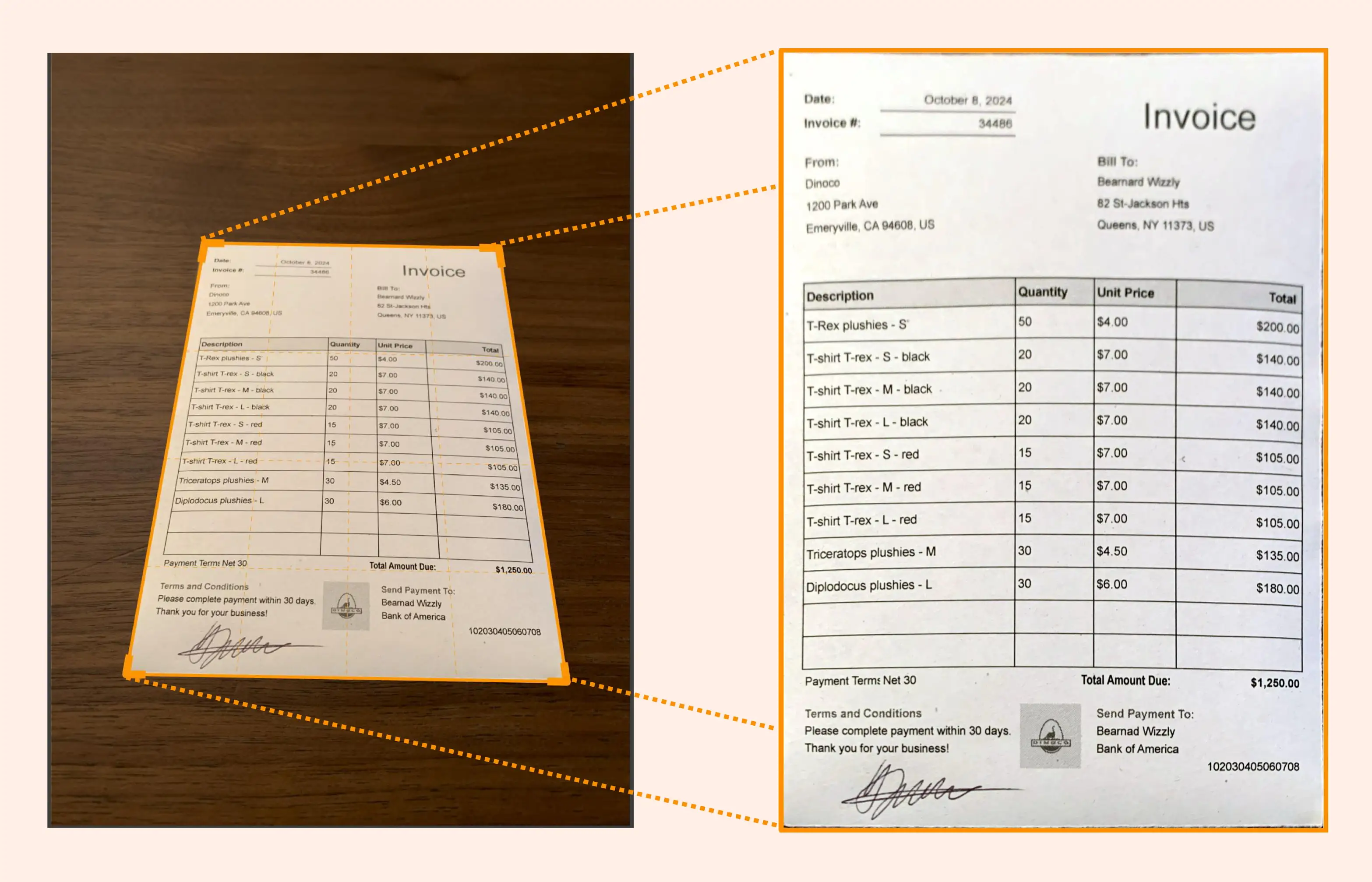
Photo of initial paper document on the left and its result when scanned with Genius Scan on the right.
左侧为初始纸质文档的照片,右侧为使用 Genius Scan 扫描后的结果。
In our case, the first step in scanning a document with a smartphone is to detect four straight lines forming a quadrilateral that matches the edges of the document. This detection must be done in real-time to provide immediate visual feedback to the user so they can adjust the position of the smartphone or the document to obtain optimum results, as detection may not function properly when the phone is too tilted or rotated, or the document is too small or distant.
在我们的应用中,使用智能手机扫描文档的第一步是检测四条直线,形成一个与文档边缘匹配的四边形。这种检测必须实时进行,以便为用户提供即时的视觉反馈,从而调整智能手机或文档的位置以获得最佳效果,因为当手机倾斜或旋转角度过大,或者文档太小或太远时,检测可能无法正常工作。
We conceived Genius Scan with this vision in mind from the outset. While our initial approach relied on traditional image processing techniques, we knew there was more to unlock. That’s when we decided to harness the power of Deep Learning. This shift didn’t just refine our document detection; it completely transformed it and drastically improved both accuracy and the overall user experience.
我们从一开始就秉持这一愿景构思了Genius Scan。虽然我们最初的方法依赖于传统的图像处理技术,但我们知道还有更多潜力有待挖掘。就在这时,我们决定利用Deep Learning的强大功能。这一转变不仅优化了我们的文档检测,更是彻底改变了它,并大幅提高了准确性和整体用户体验。
Traditional Image Processing
传统图像处理
When we launched Genius Scan in 2010, it used conventional methods to detect document edges.
2010年我们推出Genius Scan时,它使用传统方法来检测文档边缘。
The process began with edge detection using the Canny filter, which highlights sharp t...