
Revamping Myntra App Analytics persistence with KMP and SQLite
Introduction
In the dynamic landscape of e-commerce, data is the bedrock of decision-making, and app stability is the foundation of user experience. At Myntra, where millions of users engage with our platform daily, ensuring the reliability of both is paramount. This necessity drove us to re-architect a critical piece of our infrastructure: the persistence layer of the Myntra app’s analytics SDK. This post details our journey of augmenting our legacy analytics SDK with a robust new persistence engine backed by SQLite[1], achieving significant gains in app stability and data integrity.
Background: The Limits of the Legacy Pipeline
For years, our legacy in-house analytics SDK was the workhorse for collecting user interaction data. However, as our app’s event volume grew, the SDK’s aging persistence and processing logic created significant bottlenecks that led to degraded app performance and compromised the reliability of analytics data our product teams depended on.
On Android: The Legacy Pipeline and its Limits
On Android, the legacy analytics pipeline followed a straightforward event processing model:
- Capture, Persist & Batch: Events generated by used actions were held in an in-memory queue and then serialized into a persistent queue backed by SharedPreferences[2]. Once a batch threshold was met (typically 10 events), the batch was dispatched to the server.
- Background Flushing: Periodic background jobs flushed unsent events and retried failed batches.
- Error Handling: Failed batches were pushed to a separate retry queue, with older events silently purged if the queue hit its cap.

High level overview of legacy android pipeline
At the time of the initial implementation, SharedPreferences was a pragmatic choice to prioritize velocity. The ecosystem for local databases on Android was still maturing, and raw SQLite often required significant boilerplate compared to the simplicity of a key-value store.
However, SharedPreferences is architecturally limited for high-throughput transactional data. Under the hood, it is backed by a single XML file that lacks support for incremental updates. Every queue operation like adding, removing, or flushing events required re-serialization of the entire in-memory list to JSON and rewrote it back to disk:
- Full File Rewrites: All queued events were serialized into a single JSON array. Because SharedPreferences writes to disk atomically, adding a new event required rewriting the entire XML file, rather than simply appending the new data.
- Increasing I/O Cost: This structure meant that disk write times grew linearly with the queue size. Saving the 100th event required processing and rewriting the previous 99 events along with it.
- No Transactional Safety: The pipeline lacked ACID guarantees. If the app was killed during queue serialisation, in-memory events could be lost entirely.
While our legacy approach worked at a smaller scale, it became a bottleneck as the app grew. With a user now capable of generating 300–400+ events in a single session [3], this constant cycle of serializing and rewriting a growing XML file led to Out of Memory(OOM) errors and Application Not Responding(ANR) instances that impacted user experience as well as critical event data loss.
On iOS: An Opportunity for Greater Reliability
The iOS platform faced a parallel challenge. While it avoided the XML serialization bottlenecks seen on Android, the legacy pipeline which was built on LevelDB[4], was designed primarily as a temporary buffer for failed events rather than a robust, primary persistence layer. This architectural scope created specific reliability gaps:
- Transactional Bottlenecks: LevelDB’s Log-Structured Merge-tree (LSM) architecture excels at fast writes but functions strictly as a key-value store. Because it lacks secondary indexing and relational querying, complex batch orchestration like filtering by priority or updating event statuses required pulling raw data into memory for inefficient application-side filtering. Compounding this rigid structure was a lack of ACID guarantees, meaning this manual batch processing lacked transactional atomicity and risked data loss if the app terminated unexpectedly during an upload.
- Background Constraints: Unlike the robust background alignment we aimed for, the legacy system was reactive. It lacked a comprehensive mechanism to queue and reliably flush data during offline periods or rapid app terminations, leaving data vulnerable in low-connectivity scenarios.

High level overview of legacy iOS pipeline
Designing the Next Generation: Unified Persistence Layer for our apps
In order to scale this further, it was clear our pipeline needed to evolve to a true database solution. To do this, we established two core architectural principles that would guide our technology choices.
First Principle: A Unified, Cross-Platform Codebase
To solve the inconsistencies between our Android and iOS pipelines and improve development velocity, our primary goal was to create a single, shared core of business logic. Maintaining two separate codebases was inefficient and led to divergence in features and reliability.
For this, we chose Kotlin Multi-Platform (KMP)[5]. This approach allows us to write the core logic for event batching, persistence, and network flushing once in Kotlin and compile it for both Android and iOS. This ensures a consistent and reliable pipeline on both platforms while maintaining a single codebase.
Second Principle: A Robust, High-Performance Database
Given the severe performance issues with the legacy SharedPreferences method in android and the lack of complete persistence on iOS, our next requirement was a true database solution built for structured, transactional data on mobile.
We chose SQLite as our persistence layer. Before finalizing this decision, we benchmarked it against high-performance NoSQL alternatives like ObjectBox[6] and found SQLite to be a better choice for our usecase. As a relational database (RDBMS) that ships natively with both Android and iOS, it allows us to avoid external dependency bloat while delivering the structured data integrity we require.
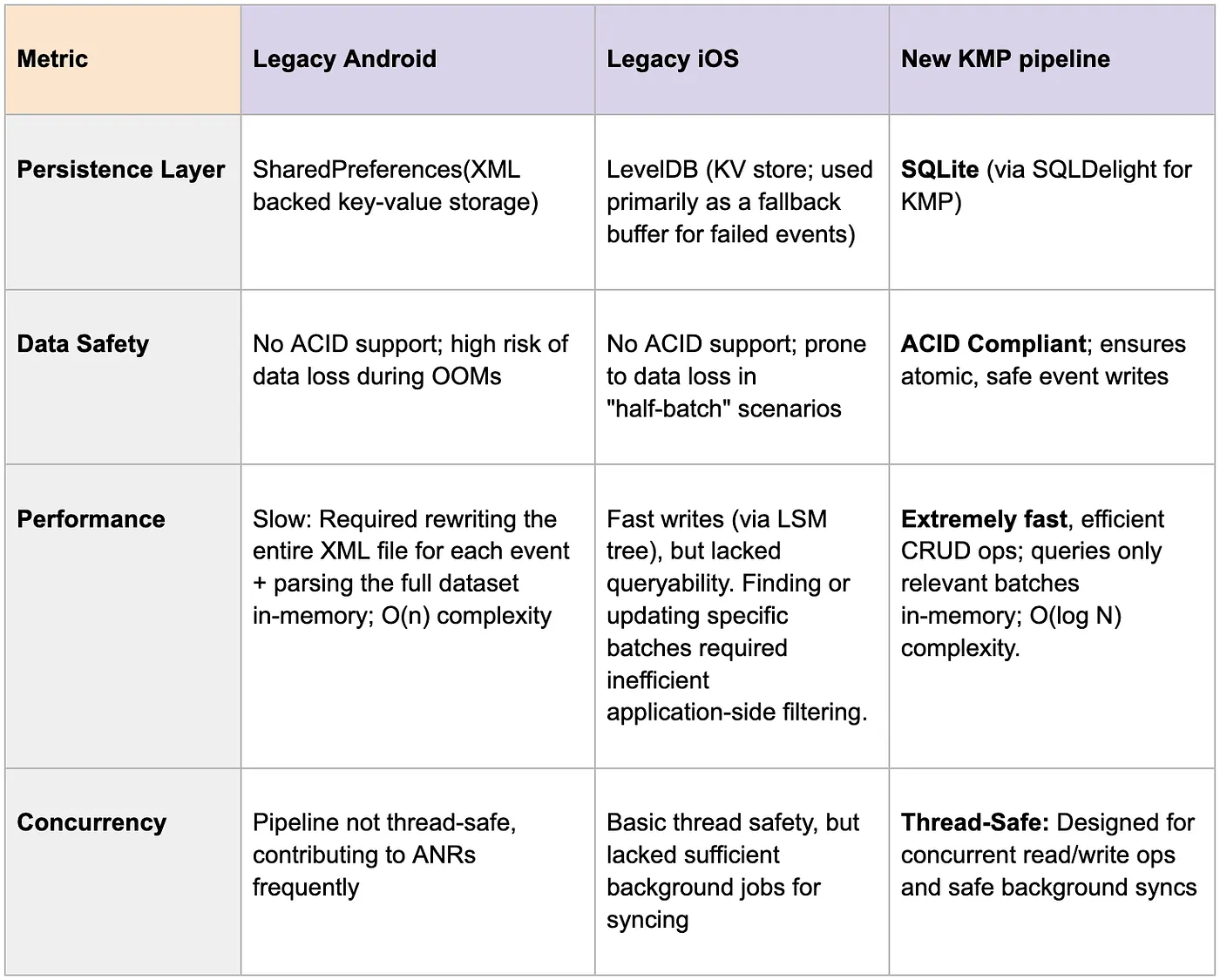
Comparison matrix b/w legacy(android/iOS) and new KMP pipeline
Fun fact: There are plausibly over 1 trillion SQLite databases in active use in production worldwide, with 4+ billion smartphones each holding hundreds of DB files.[7]
How the New Pipeline Works: A Technical Deep Dive
We designed the new architecture for resilience and efficiency, leveraging modern concurrency patterns to ensure thread safety and performance.
Handling Concurrency Safely
A core design principle was to prevent the analytics pipeline from ever blocking the main thread.
- Offloading Work: All pipeline calls are immediately moved to a dedicated coroutine scope.
- Serialized Operations: Core operations (event insertions, batch-queuing, flushing) run on single-threaded coroutine contexts, eliminating race conditions.
- Mutex Locks: We use Mutex locks to ensure that real-time dispatch and background flushing never interfere with one another, guaranteeing data consistency.
Real-time Event Handling
When a user action generates an event, the pipeline processes it immediately for quick dispatch:
- Immediate Persistence: Every tracked event is immediately serialized and inserted as a row in SQLite table with its batchId.
- Intelligent Batching: Events are processed based on priority. High-priority events have a batch count of 1 and are sent immediately, while lower-priority events are collected into larger batches (e.g., 10 events in a single batch).
- Async Dispatch: After each insertion, we query the SQLite table against an in-memory priority-batchId map; once a batch reaches its threshold, it is sent to a dedicated coroutine channel for server dispatch.
Resilient Background Flushing
To ensure data integrity for events that cannot be sent in real-time, due to network issues or rapid app termination, we implemented a robust background sync strategy tailored to each platform’s native capabilities.
Android: Powered by WorkManager
Get Kartik Sharma’s stories in your inbox
Join Medium for free to get updates from this writer.
On Android, we leverage WorkManager[8] APIs to schedule robust jobs that survive app restarts and system reboots. We schedule two types of jobs to cover all scenarios:
- One-Time Job: Triggered with a delay when the app moves to the background to flush any remaining events available in DB.
- Periodic Job: Runs at regular intervals to act as a safety net, ensuring data is eventually synced even if the app isn’t opened for days.
To be good citizens of the OS, these jobs are configured to run only when specific constraints are met, such as having an unmetered network connection and sufficient battery level.
iOS: Powered by BGProcessingTask
On iOS, we achieved feature parity by utilizing the Background Tasks[9] framework to handle background data recovery.
- System Integration: We register a BGProcessingTask during app launch. Upon entering the background, the app schedules BGProcessingTaskRequest items that align with our Android strategy, queueing both initial one-time flushes and recurring daily intervals.
- Unified Execution: When the OS initiates the background job execution, we internally route to our shared KMP flushing logic, ensuring that iOS benefits from the exact same database management and sync logic as Android.
Shared “Smart Flushing” Logic
Once a background job is running on either platform, the KMP pipeline executes a resilient flushing algorithm designed to prevent data bottlenecks:
- Prioritization: The system first attempts to upload “fresh” batches of events that have not failed previously(primarily half-batched events).
- Granular Retries: If no fresh batches are available, it shifts to processing older, failing events one-by-one. This isolation strategy ensures that a single malformed event cannot block the entire queue.
- Self-Healing: After a set number of failed retry attempts, problematic events are automatically purged from the database to maintain a healthy pipeline.
Storage Guardrails and Observability
To ensure the database never grows unbounded or degrades query performance, we built in few strict safety nets.
- Application-Level Cap: We enforce a configurable hard limit(e.g., 1000 rows) in our SQLite table. If new events push the count beyond this limit, we prune the oldest un-synced events to maintain a lightweight, highly optimized database footprint.
- Low Storage Handling: If the device’s OS reports critically low disk space, we bypass the database completely and attempt a direct HTTP network upload.
- Observability: We log these pruning and passthrough fallback events to Firebase. This gives us complete observability over our database health, ensuring it remains optimized. Furthermore, when problematic events are purged by our background self-healing logic after repeated upload failures, we log the metadata. This allows us to identify the root cause of malformed payloads and ship fixes in future updates.

High level overview of how event batching and flushing works in new KMP pipeline
Phased Rollout & Production Validation
Given the scale of our user base, swapping out the core analytics infrastructure was a high-risk operation that required zero data loss and absolute app stability. We could not simply replace the system overnight. Instead, we adopted a cautious, data-backed A/B testing strategy to validate the New Pipeline against the legacy system in production starting with our android app.
Phase 1: The “Canary” Test
We began by isolating a single, medium-traffic feature to stress-test the pipeline without risking critical business data in our android app.
- Targeted Scope: We routed events for this specific feature through the New Pipeline w/ gradual A/B rollouts.
- Goal: This validated the SQLite pipeline and batching logic in a real-world environment while keeping core p0 app flows on the legacy path.
Phase 2: Incremental Scaling
Once the canary proved stable, we expanded the New Pipeline to handle all app events.
- The Ramp-up: We started with just 1% of users, monitoring performance during high-load sales periods.
- The Climb: We gradually increased the rollout to 5%, 10%, 50%, and finally 100% userbase, pausing at each gate to verify data integrity.
Validation Results
We ran both pipelines in production behind A/B and compared performance metrics. The results were clear:
- Recovered Data: We saw a good increase in high traffic events being sent in newer pipeline v/s legacy pipeline. The legacy system was silently dropping events data during high-stress scenarios (app kills due to crashes/ANRs), which the New Pipeline successfully recovered.
- Stability Wins: As rollout increased, we observed a direct drop in OOM-related crashes and ANRs.
- Safety Net: The incremental approach allowed us to catch and fix a minor discrepancy at the 5% mark, preventing any widespread data issues before scaling out to more users.
Scaling Up on iOS
On iOS, we are following this exact playbook. Leveraging our shared codebase for feature parity, we are currently in the early A/B phases on limited pages, ensuring the transition is as robust as it was on Android.
Conclusion: Impact and The Road Ahead
The transition to the new pipeline has been a foundational upgrade for the Myntra app. By moving to a SQLite-backed persistence layer and offloading heavy lifting to background threads, we have drastically improved app stability and reduced event loss.
On Android, the impact was immediate and measurable. By eliminating heavy serialisation and the blocking I/O of the old architecture, we resolved approximately 1.1 million monthly ANR instances and ~250k monthly crashes that were directly attributed to the legacy persistence pipeline. This significantly boosted our crash-free user sessions and overall Play Store vitals and mitigated event loss due to these crashes/ANRs.
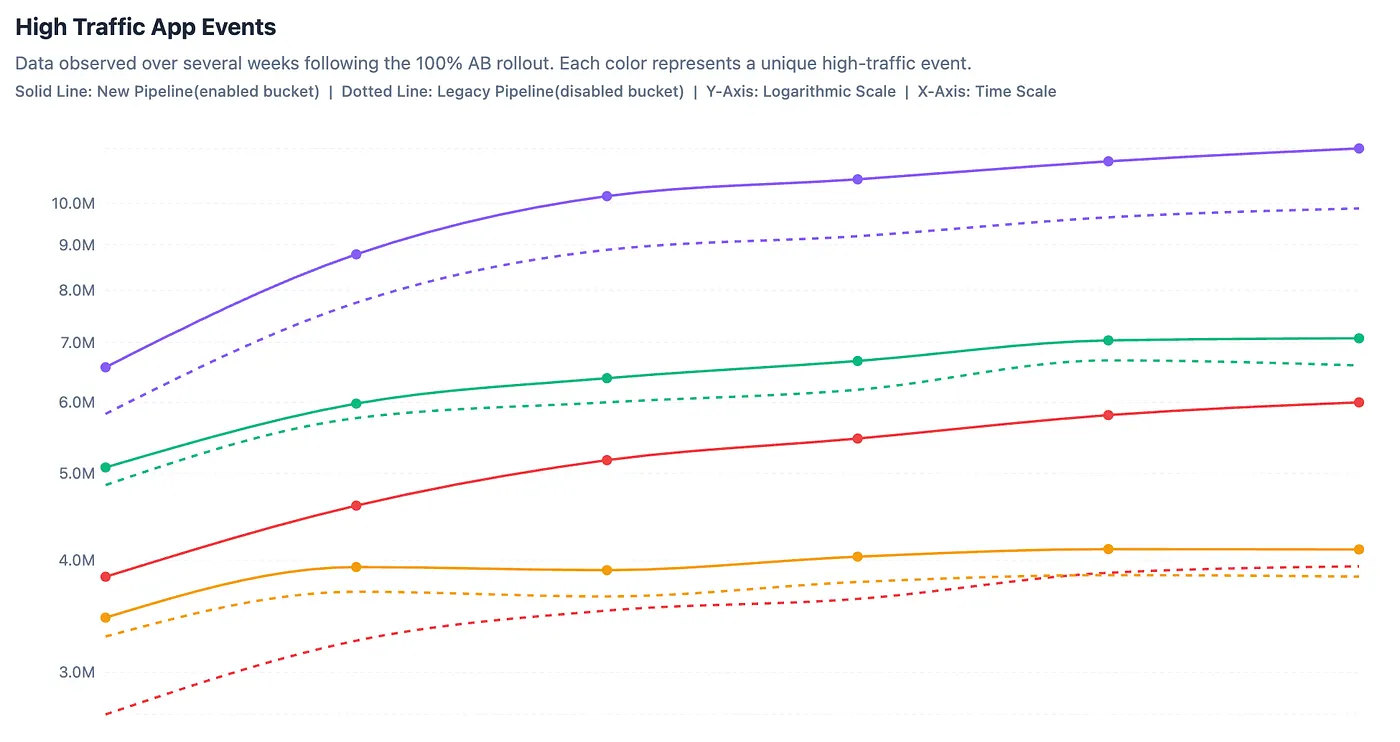
Uptrend observed in certain high traffic app events post rollout in new pipeline

Downtrend observed in Crash rate in Play console vitals post rollout
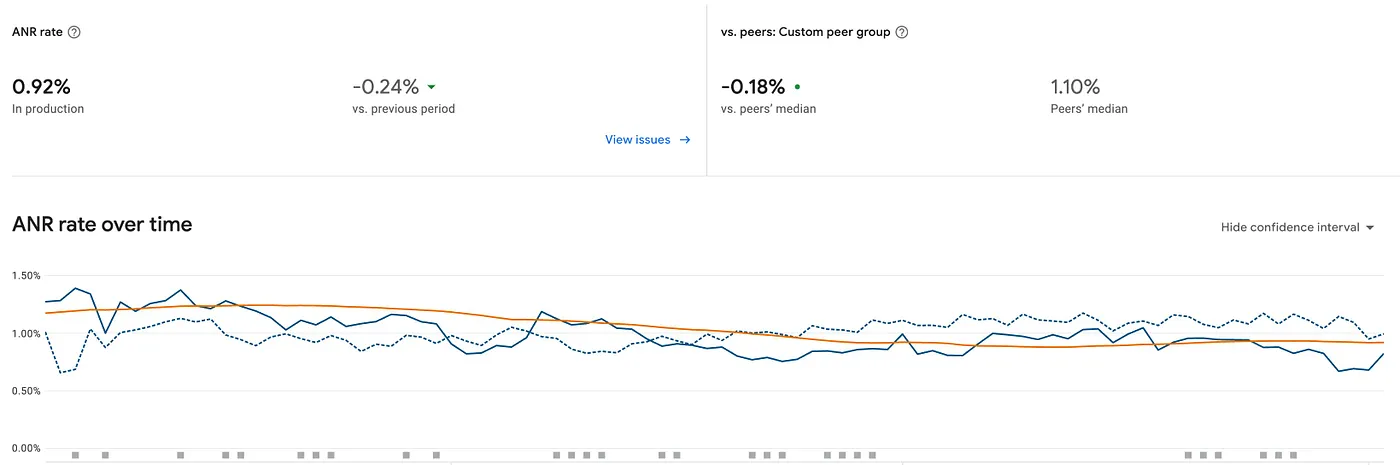
Downtrend observed in ANR rate in Play console vitals post rollout
Meanwhile, on iOS, the shift to Kotlin Multiplatform is helping us achieve architectural parity. This transition allows us to address the data loss caused by interrupted batch operations and introduces a resilient background sync mechanism.
As we continue scaling this pipeline across iOS, our focus remains clear: building infrastructure that is invisible to the user but indispensable to the business. With this new engine in place, we can now scale our analytics capabilities confidently, knowing that every click, swipe, and view is stored safely and synced reliably, regardless of network conditions or app state.
[1] https://www.sqlite.org/about.html
[2] https://developer.android.com/training/data-storage/shared-preferences
[3] Single order-placement session consists of browsing 4–5 product list pages and equivalent product detail pages.
[4] https://github.com/google/leveldb
[5] https://kotlinlang.org/multiplatform/
[7] https://www.sqlite.org/mostdeployed.html
[8] https://developer.android.com/develop/background-work/background-tasks/persistent
[9] https://developer.apple.com/documentation/backgroundtasks