
Unified Context-Intent Embeddings for Scalable Text-to-SQL
[
Your Analysts Already Wrote the Perfect Prompt
Authors: Keqiang Li, Bin Yang
In our previous blog post, we shared how Pinterest built Text-to-SQL with RAG-based table selection (Retrieval-Augmented Generation). That system introduced schema-grounded SQL generation and retrieval-augmented table selection. These were important first steps, but not enough for reliable analytics at Pinterest scale.
The challenge was fundamental: with over 100,000 analytical tables and 2,500+ analytical users across dozens of domains, simple keyword matching and table summaries were not enough. When an analyst asks “What’s the engagement rate for organic content by country?”, they need more than a list of tables with similar names. They need the system to understand analytical intent, the business question behind the query, and surface patterns that have actually worked for similar analyses.
This article describes how we evolved from basic Text-to-SQL to a production Analytics Agent that helps analysts discover tables, find reusable queries, and generate validated SQL from natural language. Now the most widely adopted agent at Pinterest, it was built on two key engineering choices:
- Unified context-intent embeddings — We transform historical analyst queries into context rich, full semantic representations that capture analytical intent — the business question a query was designed to answer, rather than raw SQL syntax. This enables semantic retrieval that understands meaning, not just keywords.
- Structural and statistical patterns with governance-aware ranking — We extract validated join keys, filters, aggregation logic, and usage signals from query history, and combine them with governance metadata (table tiers, freshness, documentation quality) to rank results. This ensures the system surfaces not just relevant tables, but trustworthy ones grounded in patterns that have actually worked.
Press enter or click to view image in full size
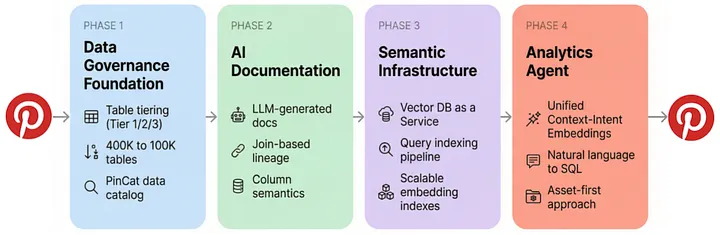
The Foundation: From 400K Tables to AI-Ready Data
Before we could build an intelligent analytics assistant, we needed to solve a more basic problem: our data warehouse was a mess.
A few years ago, Pinterest’s data warehouse had hundreds of thousands of tables, most with no clear owner or documentation. Our governance roadmap called for reducing the table footprint from roughly 400K to around 100K through standardization and cleanup.
We launched a table governance and tiering program:
- Tier 1: Cross-team, production-quality tables with strict documentation and quality requirements.
- Tier 2: Team-owned tables with lighter but still enforced standards.
- Tier 3: Everything else, including staging, temporary, and legacy tables, subject to aggressive retention and deprecation policies.
With these governance constructs, PinCat, Pinterest’s internal data catalog built on open source DataHub, became the system of record for:
- Table tier tags, owners, and retention policies
- Column-level semantics via glossary terms (reusable business concepts like
user_idorpin_id)
This governance work laid the groundwork for everything that followed. It gave us a clear map of “good” tables to prioritize and a structured way to express meaning at the column level, which are essential inputs for any AI system.
Encoding Analytical Knowledge from Query History
Here is where our approach diverges from traditional Text-to-SQL systems.
Why not just use an LLM with standard RAG? Most approaches index tables by their documentation and maybe some sample queries, then retrieve tables with semantically similar descriptions when a user asks a question. This works for simple cases, but breaks down in an environment like ours:
- The analytical question does not match any table description’s wording
- Multiple tables could answer the question, but only specific join patterns work
- The “right” way to compute a metric involves Pinterest-specific conventions
- Quality signals (table tiering), authoritative schemas, and established query patterns live in different systems, so no single search retrieves all the context needed
Without systematic access to how analytics is actually done at Pinterest — the tables, joins, filters, and metric definitions that analysts rely on daily, success depends on chance rather than grounded knowledge.
Our solution: encode analytical knowledge from query history along two complementary dimensions — unified context-intent embeddings that capture the meaning behind queries, and structural and statistical patterns that capture how queries are built and how well they perform.
Press enter or click to view image in full size
Analytical Intent as Unified Context-Intent Embeddings
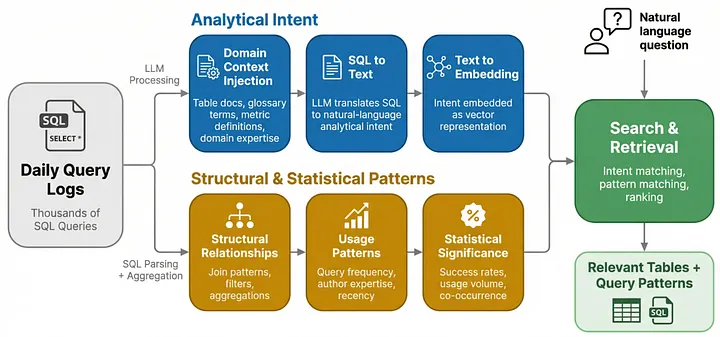
We convert each SQL query into a semantically rich natural-language description that captures the business question the query was designed to answer. This happens through a three-step pipeline:
Step 1: Domain Context Injection
Before we attempt to interpret a query, we inject Pinterest-specific semantic information alongside the raw SQL:
- Table and column descriptions from PinCat to add business context
- Standardized glossary terms (e.g., “advertiser_id” maps to.
g_advertiser_idin one table andadv_idin another) - Metric definitions (e.g., “engaged user” means specific action types)
- Domain expertise such as data quality caveats or recommended date ranges
At Pinterest’s scale, maintaining this context manually would be impractical. As we describe in Scaling Documentation with AI and Lineage, we use AI-generated documentation, join-based glossary propagation, and search-based semantic matching to keep this context rich and up to date automatically.
This context is critical: without it, a downstream LLM would see only raw table and column names and miss the business meaning behind them.
Step 2: SQL to Text
With domain context in hand, we use an LLM to translate each SQL query into a structured description of the query author’s original analytical intent. Rather than producing a simple one-line summary, the LLM generates three complementary outputs: a high-level summary that captures business purpose and domain, a set of analytical questions the query could help answer, and a detailed breakdown of the query’s logic in plain English.
Consider this ads performance query:
SELECT keyword,
SUM(impressions) AS total_impressions,
SUM(revenue) / NULLIF(SUM(IF(is_first_conversion, clicks, 0)), 0) AS cpc,
(SUM(revenue) / NULLIF(SUM(IF(is_first_conversion, impressions, 0)), 0)) * 1000 AS cpm
FROM ads.keyword_performance
WHERE dt BETWEEN '2024-10-01' AND '2024-10-31'
AND advertiser_id = 12345
AND keyword IS NOT NULL
GROUP BY keyword
ORDER BY total_impressions DESC
Our SQL-to-text transformation produces:
Summary: “Extracts ad performance metrics — total impressions, CPC, and CPM by keyword for a specific advertiser. CPC and CPM are calculated based on first-conversion events, focusing on ad effectiveness in acquiring new customers.”
Analytical questions:
- What are the top-performing keywords by impressions for a given advertiser?
- How cost-effective are ad campaigns based on CPC and CPM for different keywords?
Detailed breakdown: Column definitions, transformation logic (CPC derived from first-conversion revenue divided by first-conversion clicks), filters applied, and the business purpose of optimizing keyword targeting within the advertising ecosystem.
Two design choices make this process effective at scale. First, the analytical questions create a direct bridge between future user questions and indexed queries. When a new analyst asks “What’s the CPC for our top keywords?”, the system matches their question against questions it already knows how to answer — not just query descriptions. This is what enables intent-based retrieval to work across different phrasings, table names, and column structures.
Second, the descriptions are kept deliberately generalizable: the LLM strips temporal specifics (exact dates, individual IDs) while preserving business-meaningful values like metric types and entity categories. A query originally written for “October 2024 keyword performance” generalizes to match future questions about “ad CPC by keyword” regardless of date range. Together, these choices turn years of analysts’ institutional SQL knowledge into a reusable, searchable knowledge base.
Step 3: Text to Embedding
The natural-language description is then embedded into a vector representation. This enables intent-based retrieval: when a new question comes in, we embed it the same way and find historical queries that answered similar analytical questions, regardless of exact keyword matches. A question about “organic engagement by market” can match a query originally described as “non-promoted pin interaction rates by country” because the embeddings capture semantic similarity, not lexical overlap.
Structural & Statistical Patterns
While analytical intent captures what a query means, we also need to capture how queries are built and how well they perform. We extract two categories of hard facts from query history:
Structural patterns are derived by parsing SQL queries:
- Join patterns: Which tables are joined, on which keys, and with what conditions
- Common filters: Typical WHERE clauses and partition filters for each table
- Aggregation patterns: How metrics are computed (COUNT DISTINCT vs SUM, grouping dimensions)
- Subquery structures: Common CTEs (Common Table Expressions) and nested query patterns for complex analyses
Statistical signals are aggregated from query execution metadata:
- Table co-occurrence frequency: How often tables are queried together signals analytical relationships
- Query success rates: Patterns from successful queries are weighted higher than failed attempts
- Usage recency and volume: Recent, frequently-used patterns reflect current best practices
- Author expertise: Queries from experienced analysts in specific domains carry higher weight
These statistical signals combine with governance metadata — table tiers, data freshness, documentation completeness, to form what we call governance-aware ranking. When retrieval returns candidate tables and patterns, the system does not rank by semantic similarity alone. It fuses similarity scores with trust signals: a Tier-1 table with active ownership and fresh data ranks higher than a semantically similar but deprecated or undocumented alternative. This ensures the system surfaces not just relevant tables, but trustworthy ones.
Together, structural patterns and governance-aware ranking form a library of validated, trusted solutions that guide query generation. When the agent generates SQL, it does not guess at join keys or filters — it uses patterns that have been actively used and validated by Pinterest analysts thousands of times, drawn from the most reliable sources in the warehouse.
How the Two Dimensions Work Together
These two dimensions complement each other: analytical intent enables semantic retrieval by converting queries into meaning-rich embeddings, while structural and statistical patterns provide the concrete, validated SQL building blocks needed to act on that retrieval. The following diagram illustrates how a single SQL query flows through both dimensions to produce encoded knowledge:
Press enter or click to view image in full size
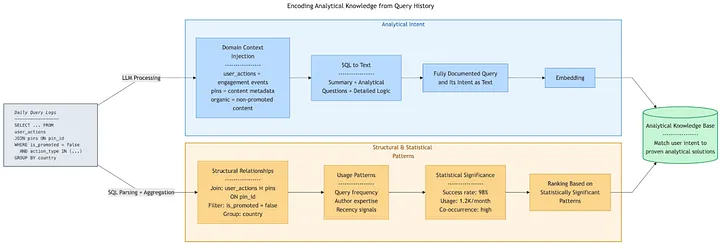
To see this in practice, consider a common analytical task:
The user asks: “What’s the engagement rate for organic Pins by country?”
What the agent retrieves:
- Analytical Intent: By leveraging its unified context-intent embedding space, the agent can retrieve highly relevant queries based on intent semantics. This capability is robust against variations in table names, column structures, and specific filters (like “by country”), which would otherwise cause failures in traditional keyword-based search. Furthermore, the agent understands that “engagement rate” at Pinterest means specific action types (saves, clicks, closeups) divided by impressions, and “organic” excludes promoted content.
- Structural & Statistical Patterns: Surfaces validated join keys (engagement queries typically join
user_actionstopinsonpin_idwith specific filters for organic content), priortizes patterns from frequently-used, successful queries (98%+ success rate, high monthly usage), and applies proven aggregation logic.
Result: The agent generates SQL that follows established patterns, uses correct join keys, and applies domain-specific business logic — all learned from the accumulated knowledge encoded in query history.
The Self-Reinforcing Learning Cycle
This setup works because of a core insight: your analysts already wrote the perfect prompt. Every SQL query an analyst has ever written, the tables they chose, the joins they constructed, the filters they applied, the metrics they computed, encodes hard-won domain expertise. Traditional Text-to-SQL systems ask an LLM to figure out these patterns from scratch for every question. We instead treat query history as a vast library of expert-authored analytical solutions, and unified context-intent embeddings are the key that makes this library searchable by meaning rather than syntax.
And because every new query enriches the library, the system is self-reinforcing. As analysts across Pinterest write more queries, each one becomes a new entry in the knowledge base:
- New analytical patterns emerge as teams develop novel approaches to measurement
- Metric calculation standards evolve and propagate across teams
- Join conventions spread as validated patterns are reused
- Domain-specific filters and aggregations become discoverable to analysts outside the original domain
The analyst who figures out how to compute retention by acquisition channel doesn’t just answer their own question — they write a reusable recipe that any future analyst can discover by simply asking in plain English. The more analysts use the data warehouse, the more knowledge the agent absorbs, and the better it gets at helping the next analyst. In effect, every analyst at Pinterest is continuously teaching the system, making the combined expertise of over 2,500 analysts accessible to everyone rather than siloed within teams.
Scaling Documentation with AI and Lineage
Unified context-intent embeddings require rich documentation to inject domain context. But manual documentation alone was never going to keep pace with a warehouse of this size.
We attacked the problem on three fronts.
AI-Generated Table and Column Docs
We built AI Table Documentation, a system that uses LLMs to generate table and column descriptions from multiple signals:
- Data lineage - upstream and downstream tables and their documentation
- Existing PinCat docs, if present
- Column-level glossary terms
- Representative example queries from QueryBook (Pinterest’s collaborative SQL editor, where analysts write, run, and share queries)
For highly curated Tier-1 tables, we kept humans in the loop. For Tier-2 tables, we flipped the ratio: LLMs draft, humans review. All AI-generated docs are clearly marked as such in PinCat, and owners are notified to review and edit over time.
Column Semantics via Join-Based Lineage
To make documentation reusable across tables, we invested heavily in glossary term propagation, which automatically infers column semantics from join patterns:
- We analyzed query logs to build a join graph between columns (e.g.,
data.pins_d.idjoining toad.ad_video_event_flat_spark.objectid) - When a well-documented column (with a glossary term like
pid_id) repeatedly joins to an undocumented column, we propagate that glossary term to the undocumented side
This join-derived lineage allowed us to auto-tag thousands of columns with high-quality glossary terms.
Search-Based Propagation
For cases where join patterns were sparse, we complemented lineage with search-based propagation: indexing glossary terms and column docs into a vector database, enabling semantic similarity search between column descriptions and existing glossary term definitions.
Together, these efforts mean that as high-quality docs are added in one place, they automatically propagate to related columns and tables, dramatically reducing the manual documentation burden.
The results have been significant. AI-generated table descriptions reduced manual documentation effort by approximately 40%, with user surveys rating over 75% of these descriptions as “usable” or better. Join-based lineage auto-tagged over 40% of columns in scope, and combined with search-based propagation, these efforts reduced overall manual documentation work by nearly 70% while keeping humans in the loop for critical assets.
Infrastructure: Vector DB as a Service
Building unified context-intent embeddings and generating AI documentation both produce vectors that need to be stored, searched, and kept up to date. As more teams across Pinterest started building LLM features — table search, Text-to-SQL, AI documentation, it became clear we were all reinventing the same infrastructure: custom indexes, ad hoc ingestion jobs, and brittle retrieval logic.
To avoid a proliferation of one-off solutions, we built an internal Vector Database as a Service.
Built on OpenSearch, Integrated with Our Data Stack
After evaluating several options, we standardized on AWS OpenSearch for our internal productivity use cases. We paired it with existing infrastructure:
- Tables as the source of truth for vectorized datasets
- Airflow to run index creation and ingestion DAGs
Teams define a vector index via a simple JSON schema specifying the index alias, vector field dimensionality (e.g., 1536-dim embeddings), and source Hive table mappings. An Airflow workflow then validates the config, creates the index, and publishes metadata so other teams can discover and reuse existing knowledge bases.
Scalable Indexing with Daily Updates
The service handles millions of embeddings across tables, queries, column descriptions, and documentation, with daily incremental updates as new data assets and queries are created.
It supports hybrid patterns that combine semantic similarity (vector distance) with traditional metadata filters. For example, you can search for “tables semantically similar to user_actions that are Tier 1 and contain impression data.”
This pattern lets teams go from zero to a production-grade vector index in days instead of weeks, without having to solve embedding, ingestion, and monitoring from scratch.
The Pinterest Analytics Agent: Putting It All Together
With governance, documentation, query indexing, and vector infrastructure in place, we could finally build what many analysts actually wanted: a natural-language assistant that understands Pinterest’s data.
The Pinterest Analytics Agent is a specialized LLM-driven system that:
- Answers questions like “What table should I use to analyze retention for organic content?”
- Generates and validates SQL from natural language
- Finds and reuses existing analytical assets where possible
A core design principle is the asset-first approach: the agent should surface existing, trusted assets — tables, curated queries, dashboards, metric definitions before generating new SQL. Today, this is implemented for table and query discovery; as we index more asset types, the agent progressively expands what it can surface, promoting reuse and consistency across teams.
Architecture Overview
The agent’s architecture has four layers:
Press enter or click to view image in full size
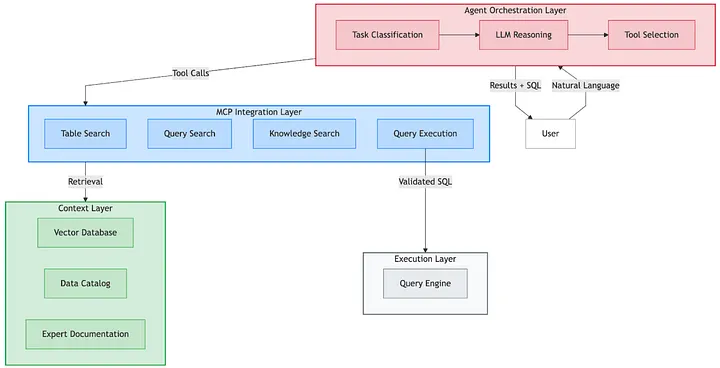
Agent Orchestration Layer: An LLM with Pinterest-specific prompts classifies tasks (documentation lookup, table discovery, query discovery, Text-to-SQL, execution) and decides which tools to call and in what order.
MCP Integration Layer: A set of Model Context Protocol (MCP) tools providing a unified interface to table search (backed by vector DB + PinCat), query search (our query description index), knowledge search (internal docs), and Presto execution with EXPLAIN validation.
Context Layer: The knowledge foundation, including PinCat schemas and table tiers, vector indexes of tables and queries, expert-curated docs and metric definitions, and usage patterns from query logs.
Execution Layer: Presto for validated SQL with EXPLAIN-before-EXECUTE, tight LIMITs, and error-recovery loops.
An End-to-End Query Flow
When a user asks:
“Show me weekly retention for new users in the US over the past three months.”
The agent:
1. Classifies the task as Text-to-SQL
2. Retrieves context in parallel• Table search and ranking using our knowledge base for semantic search and statistic based ranking• Relevant historical queries from the query index (using unified context-intent embeddings)• Table metadata from PinCat (tiers, owners, freshness)
• Any metric definitions or docs that mention retention