
常用 Git 命令清单
我每天使用 Git ,但是很多命令记不住。
一般来说,日常使用只要记住下图6个命令,就可以了。但是熟练使用,恐怕要记住60~100个命令。
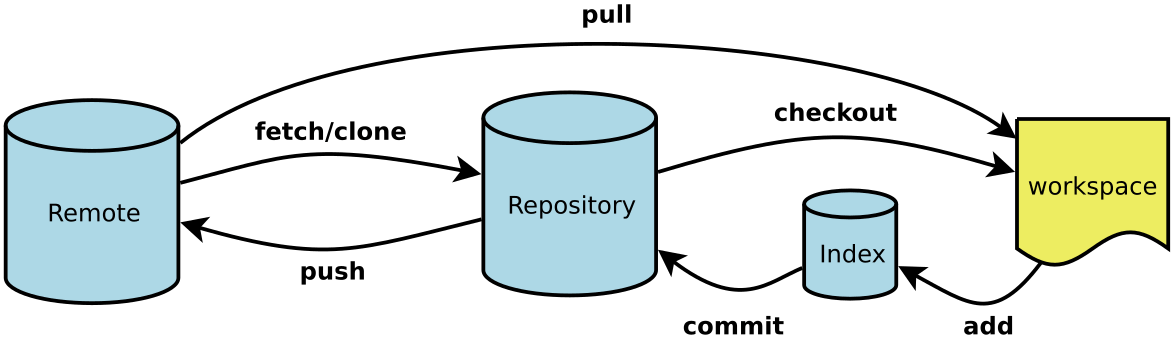
下面是我整理的常用 Git 命令清单。几个专用名词的译名如下。
- Workspace:工作区
- Index / Stage:暂存区
- Repository:仓库区(或本地仓库)
- Remote:远程仓库
一、新建代码库
$ git init $ git init [project-name] $ git clone [url]
二、配置
Git的设置文件为.gitconfig,它可以在用户主目录下(全局配置),也可以在项目目录下(项目配置)。
$ git config --list $ git config -e [--global] $ git config [--global] user.name "[name]"
$ git config [--global] user.email "[email address]"
三、增加/删除文件
$ git add [file1] [file2] ... $ git add [dir] $ git add . $ git add -p $ git rm [file1] [file2] ... $ git rm --cached [file] $ git mv [file-original] [file-renamed]
四、代码提交
$ git commit -m [message] $ git commit [file1] [file2] ... -m [message] $ git commit -a $ git commit -v $ git commit --amend -m [message] $ git commit --amend [file1] [file2] ...
五、分支
$ git branch $ git branch -r $ git branch -a $ git branch [branch-name] $ git checkout -b [branch] $ git branch [branch] [commit] $ git branch --track [branch] [remote-branch] $ git checkout [branch-name] $ git checkout - $ git branch --set-upstream [branch] [remote-branch] $ git merge [branch] $ git cherry-pick [commit] $ git branch -d [branch-name] $ git push origin --delete [branch-name]
$ git branch -dr [remote/branch]
六、标签
$ git tag $ git tag [tag] $ git tag [tag] [commit] $ git tag -d [tag] $ git push origin :refs/tags/[tagName] $ git show [tag] $ git push [remote] [tag] $ git push [remote] --tags $ git checkout -b [branch] [tag]
七、查看信息
$ git status $ git log $ git log --stat $ git log -S [keyword] $ git log [tag] HEAD --pretty=format:%s $ git log [tag] HEAD --grep feature $ git log --follow [file]
$ git whatchanged [file] $ git log -p [file] $ git log -5 --pretty --oneline $ git shortlog -sn $ git blame [file] $ git diff $ git diff --cached [file] $ git diff HEAD $ git diff [first-branch]...[second-branch] $ git diff --shortstat "@{0 day ago}" $ git show [commit] $ git show --name-only [commit] $ git show [commit]:[filename]

$ git reflog
八、远程同步
$ git fetch [remote] $ git remote -v $ git remote show [remote] $ git remote add [shortname] [url] $ git pull [remote] [branch] $ git push [remote] [branch] $ git push [remote] --force $ git push [remote] --all
九、撤销
$ git checkout [file] $ git checkout [commit] [file] $ git checkout . $ git reset [file] $ git reset --hard $ git reset [commit] $ git reset --hard [commit] $ git reset --keep [commit] $ git revert [commit]

$ git stash
$ git stash pop
十、其他
$ git archive
(完)