
Kotlin Multiplatform in Production: Two Real-World Use Cases from Booking.com
[
Booking.com Engineering
](https://medium.com/booking-com-development?source=post_page---publication_nav-1c36c35f9c76-46ffe13a773d---------------------------------------)
[

](https://medium.com/booking-com-development?source=post_page---post_publication_sidebar-1c36c35f9c76-46ffe13a773d---------------------------------------)
Software engineering at Booking.com

KMP @ Booking.com
Introduction
For the majority of Booking.com travelers, mobile is the primary channel for researching, planning, and booking trips. Recent data shows that over 80% of travelers rely on a mobile app during the research phase, with more than half of all bookings occurring on mobile devices. Consequently, the Android and iOS platforms are critical to the company’s product strategy; engineering choices made here have significant repercussions for the entire organisation.
To maintain agility at this scale, two elements must function in unison:
- Strict decision validation: At any time, Booking.com manages over 1,000 simultaneous experiments across its product suite, with hundreds active on mobile. Every minor adjustment undergoes A/B testing via our proprietary experimentation library before reaching the user.
- A unified design system ensures product consistency and makes design goals transparent to all contributors, not just maintenance engineers.
This article examines two specific engineering challenges solved using Kotlin Multiplatform (KMP) and Compose Multiplatform (CMP):
- Developing a shared experimentation library to ensure uniform experiment assignments across Android and iOS.
- Using Compose Multiplatform to host our Android design system in a web browser, bridging the gap between design concepts and implementation.
While both cases use the same underlying technology, each provides unique insights into multiplatform development.
Use case 1: shared experimentation library on Android and iOS
The problem with two implementations
Historically, our internal experimentation library, responsible for managing experiment assignments, evaluations, and tracking on mobile, was maintained as two distinct codebases: a mix of Java and Kotlin for Android and Objective-C for iOS. While intended to be identical, managing two languages with fluctuating team resources inevitably led to logic drift. Discrepancies in event-tracking and experiment-fetching behaviours emerged, though they were often challenging to detect without a direct, side-by-side comparison of both implementations.
The implications of this drift are significant. When Android and iOS users follow slightly different assignment rules for the same experiment, the resulting data becomes incomparable. In an environment with hundreds of active mobile experiments, minor inconsistencies in logic can quietly compromise data integrity across the board. The true risk isn’t a technical failure like a crash, but rather the erosion of data quality leading to incorrect product decisions.
Why KMP and why now
During the design phase of the new library specification, we shifted our focus from execution to efficiency, questioning the necessity of dual implementations. Given the complexity of the spec and the mandatory requirement for consistency, maintaining two independent codebases appeared to be a risk that could only compound over time.
Kotlin Multiplatform (KMP) provided a strategic alternative: centralising the core logic in Kotlin and compiling it for both Android and iOS native targets. Under this model, the assignment engine, evaluation rules, and experiment state machine reside within a single module supported by a unified test suite. Meanwhile, each platform retains its specific integration layers, such as analytics, storage, and networking, leveraging existing native libraries.
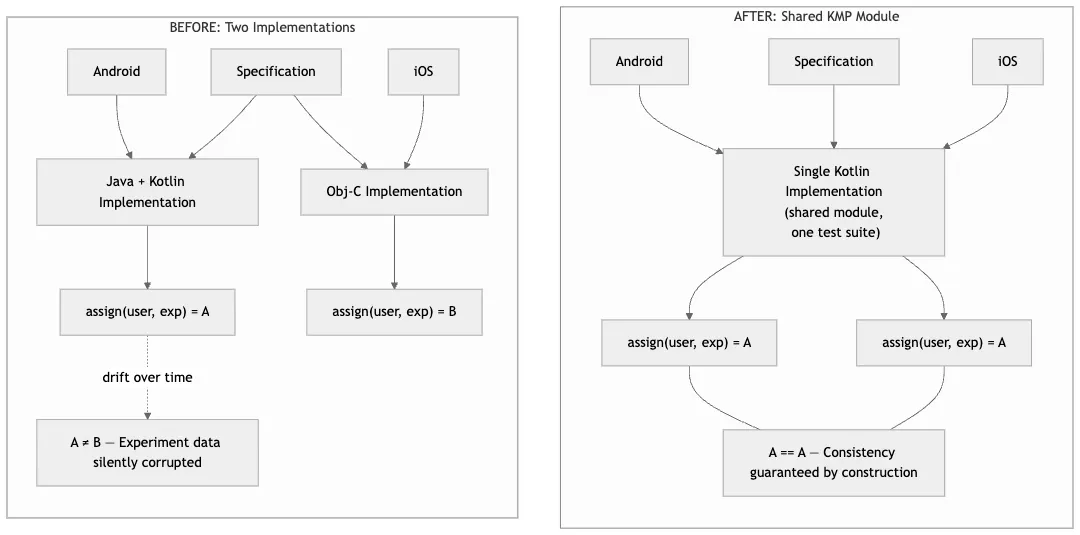
Before vs after: consistency guarantee
Library architecture
The architecture follows a clean separation: a shared Kotlin module houses the central experimentation logic. Integration differs by platform to minimise friction:
- Android: the module is treated as a standard library dependency, requiring no specialised tooling or overhead for Android engineers.
- iOS: the Kotlin compiler automatically generates a Swift compatible API from the public interface. The module is then bundled as an XCFramework and distributed as a prebuilt binary via Cocoapods.
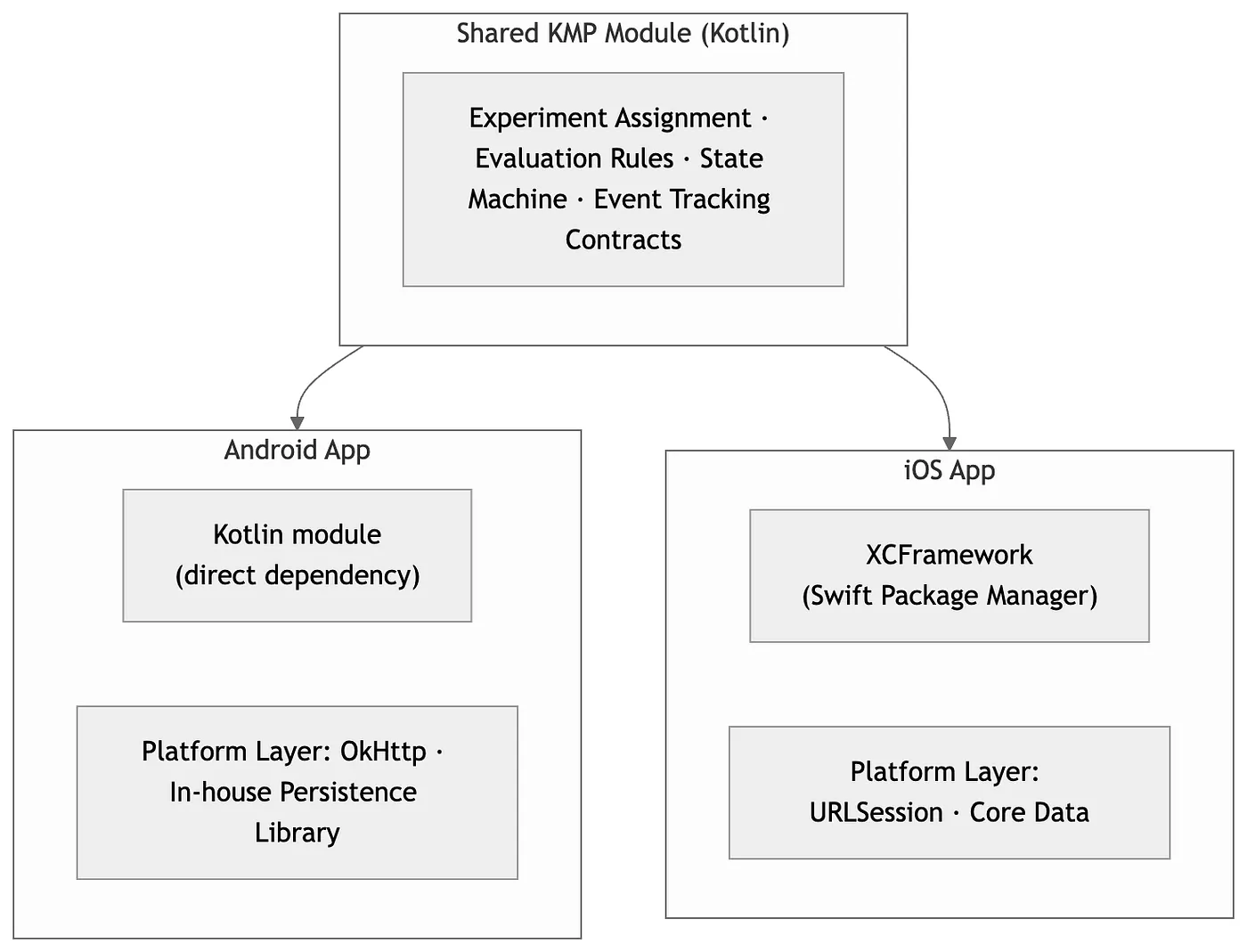
Shared experimentation library architecture
Existing native libraries on each platform continue to handle specific concerns such as analytics, storage, and networking. This intentional strategy leveraged the apps’ established infrastructures, minimising governance overhead, limiting the impact on binary size, and keeping the initial migration focused.
However, KMP is fully equipped to handle these architectural layers. For projects already using DataStore for persistence or Ktor Client for networking, extending the shared approach to include these layers would be a logical progression.

Build and Distribution Pipeline
A unified CI pipeline handles modifications to the shared module, triggering simultaneous compilation paths. This ensures that a single test suite validates behavioural parity across JVM and Native targets before distribution. Integration is streamlined for both platforms: Android consumes the shared module as a standard Gradle dependency, making it identical to any internal library. On iOS, XCFramework is distributed as a precompiled binary via the Cocoapods. Thanks to Swift compatibility, iOS developers can leverage the library without ever touching Kotlin source code. We plan to adopt Swift Package Manager and direct Swift Export.
Bringing iOS on board
Integrating a Kotlin-centric library into an iOS ecosystem is as much a cultural as a technical shift. It requires iOS engineers to embrace a dependency they did not create, written in a language outside their routine toolkit. To ensure success, iOS-specific priorities had to be addressed as primary goals rather than secondary considerations.
To facilitate this, an iOS developer spearheaded a rigorous evaluation framework. This document scrutinised essential iOS metrics, including developer experience, deployment workflows, binary size, startup performance, debugging tooling, and robust monitoring tools like crash symbolication. Most importantly, it defined a clear “exit ramp”: if KMP failed to meet these standards, the library would be rebuilt natively in Swift. This eliminated the pressure of sunk cost fallacies from the outset.
This strategy established a culture of transparency where evidence took precedence over hype. Because the Android team maintained the library as a pre-compiled binary, iOS engineers were not tasked with becoming Kotlin experts; instead, they acted as evaluators and integrators. This distinction simplified the partnership, ensuring that when KMP was ultimately approved, it was met with authentic support from the iOS team rather than mere compliance.
Validating the migration
Simultaneously launching a fresh implementation across two platforms carries significant risk. To mitigate this, we ran the new KMP version alongside the legacy system. Both were managed via platform-specific experiment flags, which served as kill switches to facilitate a controlled rollout and enable immediate rollbacks.
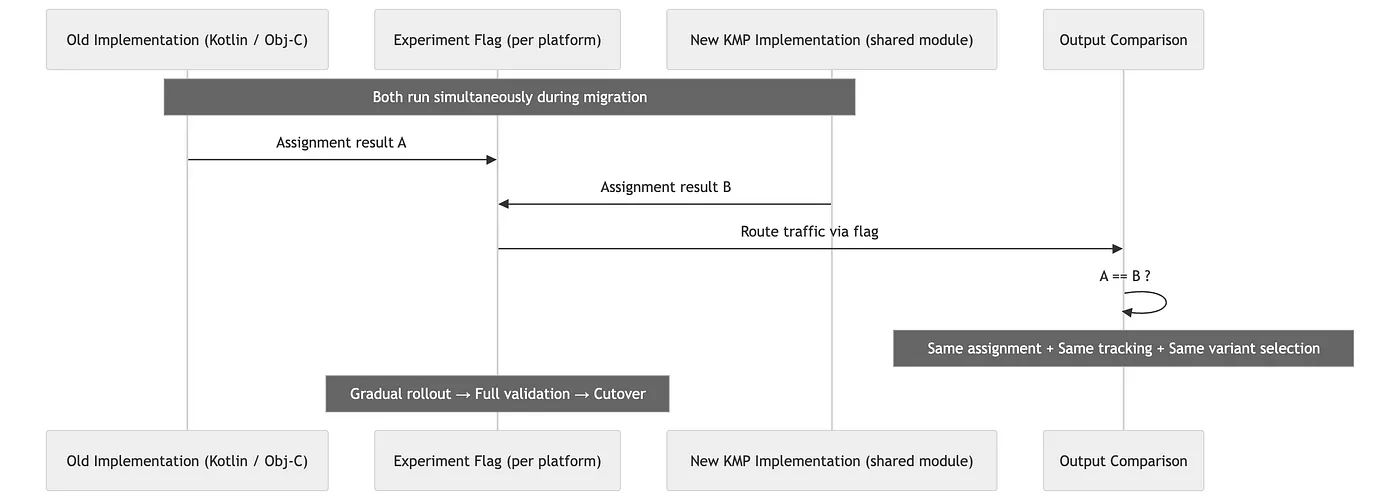
Migration Validation Strategy
The validation process took a meta-approach: we ran an experiment to test the experimentation library itself. To ensure a seamless transition, both the legacy and new KMP versions were operated concurrently, enabling side-by-side comparison of outputs. This verified that the KMP implementation generated consistent, assignment-compatible results prior to the final cutover. Although this simultaneous execution caused a temporary increase in binary size, it was viewed as a necessary and manageable trade-off for a secure migration.
Performance trade-offs
There’s no meaningful performance impact on Android, as KMP generates standard Kotlin bytecode with runtime behaviour that is indistinguishable from a native implementation.
The iOS results are more complex. During the parallel migration phase, when both the legacy Objective-C and new KMP libraries were active, startup time increased by about 140 ms at the 90th percentile, and the app download size grew by approximately 2.5 MB. Relevant metric owners reviewed these changes and accepted them as negligible.
Post-migration, the data shifted positively. Once the experiment was validated and the KMP version became the sole implementation, iOS startup times actually improved. This gain is likely due to Kotlin coroutines outperforming the threading model used in the original Objective-C library, though precise measurement is challenging given the inherent noise of large-scale migrations.
For organisations considering KMP, it is vital to recognise that performance data collected during a migration may be skewed. The true performance profile often only becomes clear in the steady-state environment after the legacy codebase has been decommissioned.
The collaboration effect
An unexpected but significant outcome of this migration was the emergence of iOS engineers as active contributors to the shared Kotlin repository.
Get Diego Gómez Olvera’s stories in your inbox
Join Medium for free to get updates from this writer.
Under the previous dual-implementation model, contributing to a different platform was a daunting task that required mastering an entirely different language and codebase, with no defined ownership structure. KMP transformed this dynamic by making the core logic accessible to any developer comfortable with Kotlin. This allowed iOS engineers to engage more deeply with the system: interpreting the logic, validating behaviours, and eventually providing patches. Beyond technical efficiency, KMP fosters a shift from mere code sharing to a model of collaborative, shared ownership.
However, engineering leads must manage expectations regarding the iOS developer experience. Because Xcode lacks native Kotlin support, developers miss out on standard IDE features such as syntax highlighting, code navigation, and autocomplete. While debugging can be handled via the unofficial LLDB-based Xcode Kotlin plugin and symbolicated crash logs provide visibility into Kotlin stack frames, the tooling gap remains a factor to consider.
Use case 2: cross-platform UI preview using Compose Multiplatform
The gap between design and implementation
The Booking User Interface (BUI) serves as the design foundation for Booking.com across Android, iOS, and the web. Its Android variant, BUI Compose, leverages Jetpack Compose to standardise components, tokens, typography, and colour. However, as is common with design systems, the space where design meets engineering often faces operational friction.
The primary hurdle is accessibility. Traditionally, for a designer to inspect a component’s behaviour or appearance across various parameters, they had to run the Android application. This process requires a full development setup, including emulators or physical devices, as well as the technical expertise to build the project. These requirements are often impractical for designers, product managers, or non-Android engineers. Consequently, stakeholders frequently rely on outdated documentation, static captures, or direct assistance from Android developers.
Addressing this gap was prioritised to solve three key issues: the constant need for developers to toggle between their laptops and mobile devices, the limitations of small phone screens for viewing side-by-side documentation and Figma designs, and the general lack of visibility of these tools for those outside the Android department.
Choosing a target platform
To bring the playground to the desktop, we assessed three approaches: an iPad app running on the Mac, a native Mac application, and a web-based solution. Each prototype was measured against three core requirements: user experience, migration effort, and the ability to leverage existing playground infrastructure.
The Mac app offered the most straightforward migration path: both Android and Mac run on the JVM, and most components worked with minimal changes. However, it required developing a completely new host application. Furthermore, the requirement for manual installations and updates delivered a subpar user experience.
The option of an iPad app on Mac was attractive because it could reuse the iOS playground infrastructure. However, the migration was more complex because iOS lacks JVM support. This would require creating custom wrappers for platform-specific APIs, such as date and locale handling. Moreover, this approach failed to address the friction in installation and updates.
Despite a significant initial investment in migration, the web app emerged as the superior choice. Its primary advantage is accessibility. Being browser-based, it eliminates the need for installations or updates while integrating seamlessly with existing web infrastructure. Ultimately, we determined that the permanent UX improvements outweighed the one-time cost of migration.
Compose Multiplatform for the web
By leveraging Compose Multiplatform from JetBrains, the BUI team expanded Jetpack Compose capabilities beyond the Android ecosystem. To prioritise wide-reaching browser support, Kotlin/JS was selected as the specific implementation path for our web-based targets.
This transition is rooted in a fundamental concept: a Jetpack Compose @Composable function serves as a platform-agnostic representation of UI state. Because these functions do not rely on Android intrinsically, they can produce output for various platforms when paired with a compatible Compose runtime and rendering backend. This architecture is particularly well-suited for design systems, as components typically consist of pure UI logic devoid of platform-specific ties.
The component playground
The BUI Compose library is fully accessible in a browser, with every component, state, and theme variant available in a live, interactive environment. This playground allows real-time property adjustments and theme switching without an Android device, an IDE, or a local build. Leveraging the expansive canvas of a browser, the platform also integrates Figma designs and component documentation side-by-side, providing essential context that remains out of reach on mobile screens.
Crucially, the playground renders the exact @Composable functions used in the Android application. Rather than a separate web-based recreation or a simple simulation, it is the authentic design system operating directly within the browser.
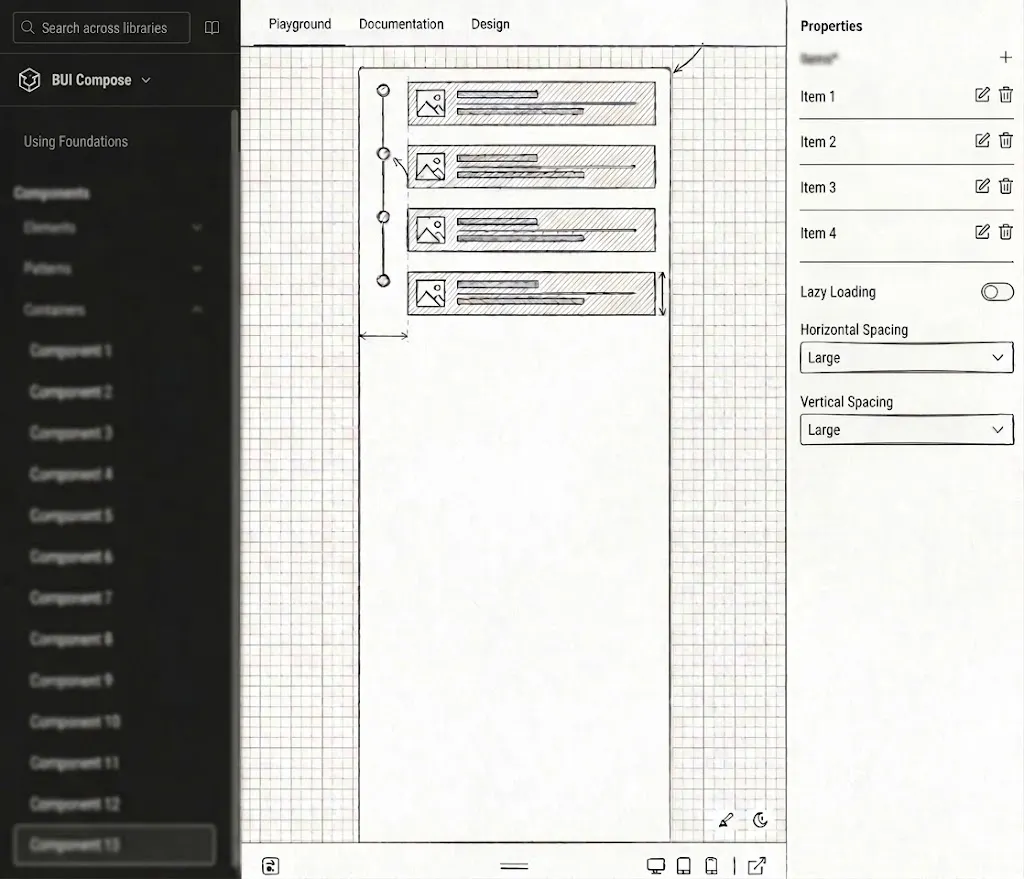
Browser-based interactive playground with live component preview, control panel, and integrated Figma/docs
KMP architecture
The infrastructure is built as a standard Kotlin Multiplatform project featuring two specific targets. The primary target, androidMain, compiles to standard Jetpack Compose, while jsMain uses Kotlin/JS to execute in the browser via the CMP web runtime.
Shared logic, including component behaviours, theming, and public APIs, is centralised in commonMain. While the migration required effort, it remained focused, with the primary challenge being the creation of multiplatform abstractions for platform-specific APIs, such as locale handling. To avoid the overhead of delegation or wrapper classes, we employed typealias actuals. This approach maps the expect declaration directly to the native type of each platform:
// commonMain
expect class BuiLocale
// androidMain
actual typealias BuiLocale = java.util.Locale
// jsMain
actual typealias BuiLocale = Intl.Locale
By using BuiLocale within the component logic, the platform-specific binding remains hidden from the call site. We also used this strategy for date-time formatting. With these core abstractions established, porting additional components required no further engineering work.
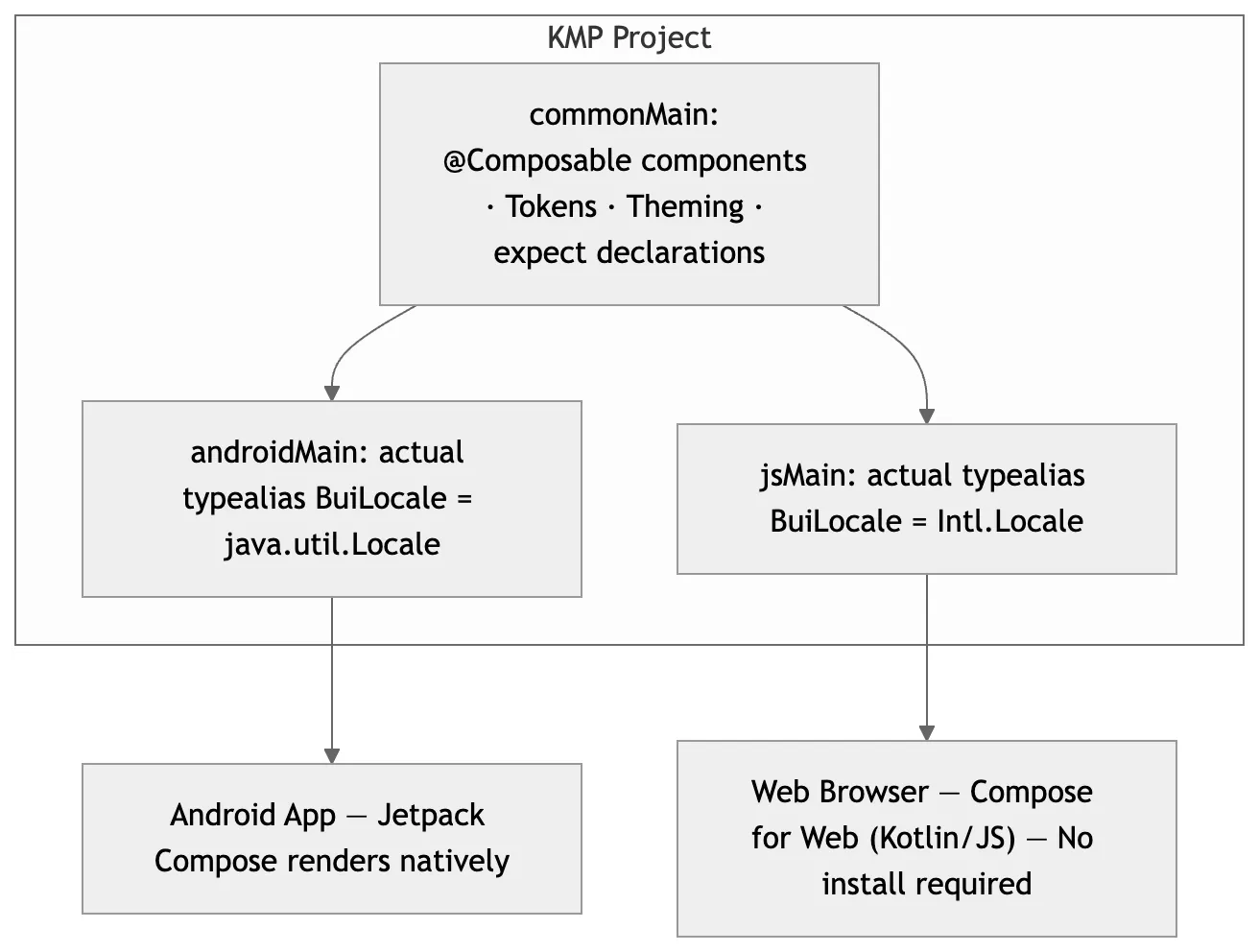
BUI Compose multiplatform architecture
An annotation processor manages the integration of each component into the control panel. It automatically generates JavaScript property mappings to power the controls and a Kotlin renderer to construct the component from those values for every BUI Compose element. This automation ensures that incorporating a new component into the playground requires no manual binding code.
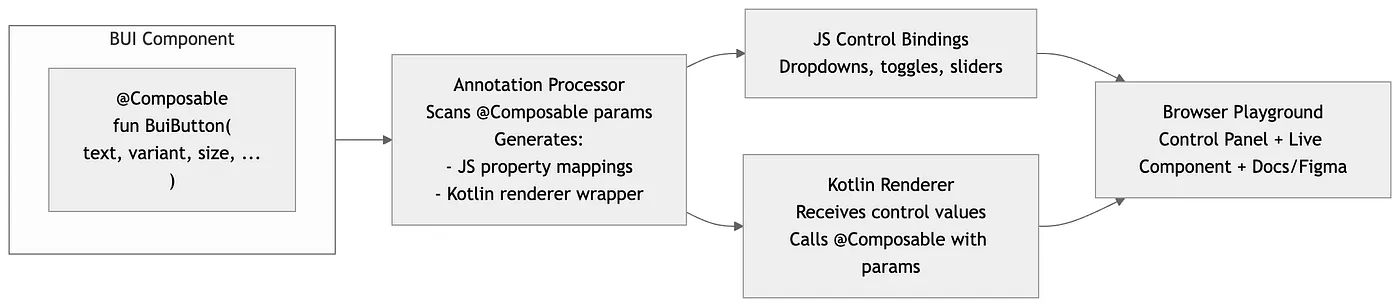
Playground component pipeline
Kotlin/Wasm represents the logical evolution for this architecture. While Kotlin/JS was initially selected to ensure broad compatibility, the system is structured for a seamless transition once WebAssembly support matures, as it offers superior performance for UI rendering.
What it changes
Beyond the technical shift, the primary impact is collaborative. During design reviews, the playground allows designers to demonstrate precise component behaviour using actual production code next to Figma references, rather than rough approximations. This makes it simple to access edge cases and states that are typically challenging to configure in a full application build. Consequently, any inconsistencies between the design intent and the actual component behaviour are identified early in the process, well before implementation begins.
The playground has successfully made the design system accessible to a broader audience. It enables engineers across different platforms, external contributors, and new team members to explore and understand BUI Compose components without configuring an Android development environment.
Since its introduction, the playground has been adopted by Android engineers, designers, product managers, and engineering managers. This cross-functional use confirms the original goal: ensuring the design system is transparent and understandable for everyone involved in the product, not only the engineers who maintain it.
What to watch out for
Compose Multiplatform lags behind Jetpack Compose for Android. New APIs, components, and features land on Android first, and some remain Android-only. In our experience, the migration efforts were largely confined to platform-specific APIs, such as date formatting and locale handling, which required multiplatform wrappers. However, the core component logic remained unchanged. By using the expect/actual mechanism, we effectively addressed these differences, and once the initial wrappers were established, porting additional components became seamless.
iOS is not a rendering target for BUI Compose: the iOS application continues to use SwiftUI for its design system implementation. However, iOS engineers still derive indirect value from BUI Compose. The playground provides a live, cross-platform reference for component behaviours and edge cases, serving as a functional guide to the shared design language accessible to all team members.
Patterns and observations
While these implementations leverage the same core technology, they apply it to solve distinct architectural challenges.
A key observation is that KMP adoption is not a binary choice. Rather than asking if the technology should be used at all, teams should evaluate which specific layer provides the most value when shared. For our experimentation library, the priority was the logic layer, whereas for BUI, it was the rendering layer. By keeping platform-specific integrations native, developers can apply KMP selectively to high-impact areas, ensuring no engineering effort is misallocated.
Given that the shared code is written in Kotlin, Android developers naturally become the primary owners of these modules. This transition is seamless for them as it uses their existing expertise and toolset. However, this creates a dependency for iOS and web engineers on a codebase they may find less familiar. Success in this model depends on establishing clear ownership and designing robust, intuitive APIs at the integration boundaries to facilitate smooth cross-platform collaboration.
Tooling maturity remains a critical factor, even as the ecosystem evolves rapidly. When these projects launched, the experience was seamless on Android but presented known challenges on iOS and the web. Since then, significant progress has been made: Kotlin/Wasm has emerged as a mature option for Compose, and Swift Export is advancing toward a stable, idiomatic alternative to the cinterop/XCFramework workflow. Today’s teams are entering a KMP ecosystem that is significantly more robust and refined than the one available during our initial implementation.
Conclusion
Rather than displacing native platform development, KMP secured its position in our stack by identifying the optimal layers for sharing. For our experimentation library, logic sharing ensured cross-platform correctness and marked the first time Android and iOS engineers collaborated within the same codebase. For BUI Compose, sharing the rendering layer extended our design system’s reach to anyone with a browser, removing the exclusivity for Android developers.
The unifying factor was that both scenarios presented specific, practical challenges for which KMP was uniquely qualified to provide a superior solution.
The BUI playground achieved its exact goals: designers can now evaluate live components directly against Figma designs, gaining instant feedback without technical hurdles or complex installations. Conversely, the experimentation library yielded an unexpected benefit: iOS engineers began actively contributing to shared Kotlin code. Whether planned or incidental, these results confirm a fundamental principle: sharing the appropriate layer goes beyond eliminating redundancy. It acts as a catalyst for consistency and deeper interdisciplinary collaboration.