

openloomi-feature-guide
GitHub用于解答OpenLoomi产品功能、使用方法及核心概念(如Loop、Connector等)的指南,帮助用户理解其作为开源AI协作者的工作机制与集成方式。
Trigger Scenarios
Install
npx skills add melandlabs/openloomi --skill openloomi-feature-guide -g -y
SKILL.md
Frontmatter
{
    "name": "openloomi-feature-guide",
    "description": "Use this when users ask about openloomi features, capabilities, or how to use it. Examples: 'openloomi 怎么用', '你能做什么', 'What can you do?', 'How does openloomi work?', 'Tell me about openloomi features', 'What platforms does openloomi support?', 'How do I use scheduled tasks?', 'What is Loop?', 'How does the attention agent work?', 'What is a Decision Card?', 'How do connectors work?', 'How do I extend Loop with custom types?', 'What is a classifier rule?', 'How do I plug openloomi into Claude Code \/ Codex?'"
}
Note: If you haven't downloaded or installed openloomi yet, please refer to Getting Started for installation instructions.
OpenLoomi Product Features
Use this skill when users ask about openloomi features, usage, or capabilities. Provide accurate and easy-to-understand feature introductions and operation guides. The terms used here (Loop, Signal, Decision, Card, ActionKind, Attention Agent, Connector, Memory, Audit Log, Plugin, Agent Runtime, Composio, etc.) are defined in the Glossary below — read it first if a user asks anything conceptual.
What is OpenLoomi
OpenLoomi is an open-source AI coworker, driven by an attention agent. It connects your authorized work tools and screen content, builds a holistic context of your people, projects, and decisions, and tells you what happened, why it matters, what to do next — and surfaces daily summaries — saving your attention for what matters.
Use it standalone, or plug any Agent framework into the same resident desktop: Claude Code, Codex, OpenCode, Hermes, and OpenClaw all work. The desktop attention agent (a small fox named Loomi) lives on top of your screen and surfaces the day's decisions as gentle bubbles you can approve in one tap.
Glossary
OpenLoomi is best read as a single chain from input to action, not as one big chat window. Connectors bring events in, Memory holds context, Loop decides what matters and turns each signal into a Decision card, the Attention Agent (Loomi) shows the card on your desktop, you tap Approve, and an Action Runner executes through a Connector — then the outcome is written back to Memory and recorded in the Audit Log.
This page exists to make that chain legible. It first walks the chain end-to-end, then defines every concept you're likely to meet in other pages, and finishes with a short table of distinctions that get confused in practice. Every cross-reference links to an existing page; nothing here duplicates their full setup or configuration.
How the concepts fit together
OpenLoomi is one pipeline. The same pieces appear on every page, just framed differently.
Two parallel input paths feed the same context layer. The main one is real-time and runs through Loop; the side one is screen-based and lands in Memory without going through Signals.
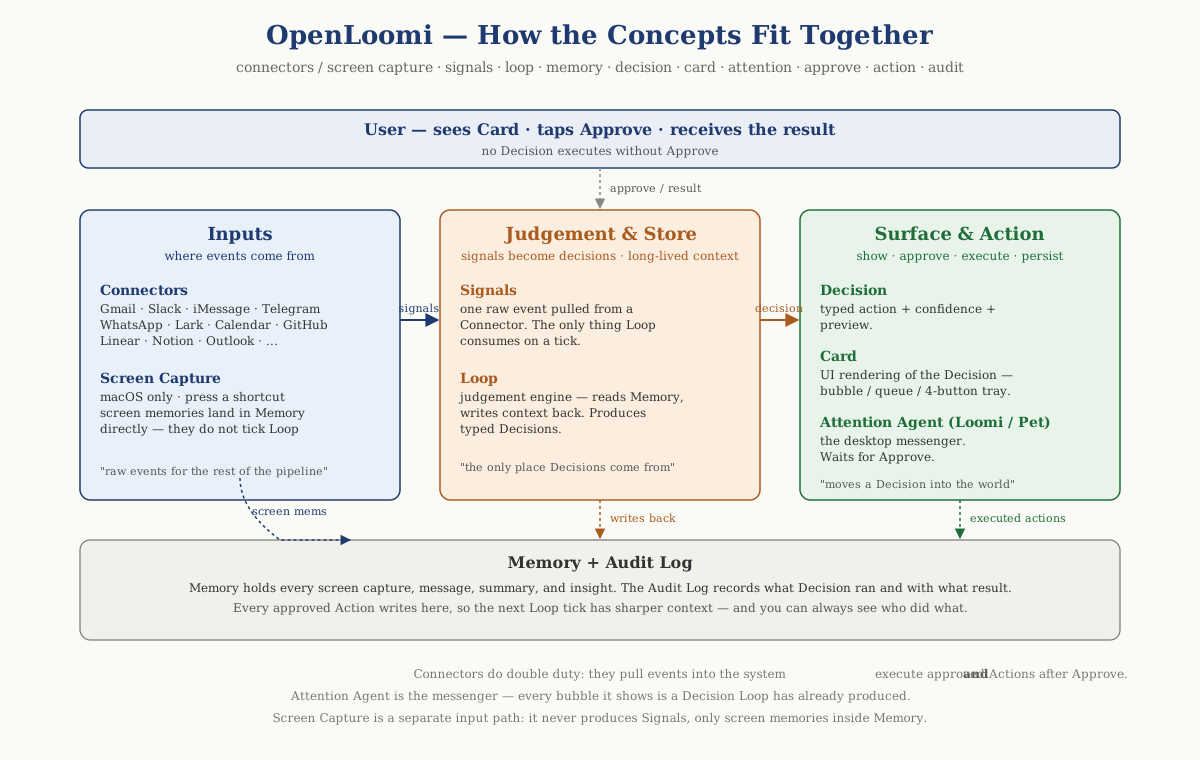
A short reading guide for the figure:
- Connectors are the real-time input path: they pull raw events from external platforms and turn them into Signals, which Loop polls on its tick. Everything that becomes a Decision card comes in this way.
- Screen Capture (macOS only) is the side input path: pressing the global capture shortcut summarises the frontmost window and the result is stored directly as a Memory record. Screen memories show up alongside messages, summaries, and insights inside Memory; they do not flow through Signals and Loop won't tick on them.
- Memory is the long-lived context layer: people, projects, prior decisions, summaries, insights, screen memories, and Knowledge Base chunks. Loop reads the relevant slice before it judges; Chat reads Memory through retriever skills; the result of every approved action is written back into Memory.
- Loop is the only thing that produces Decisions. A Decision is the typed judgement ("this email needs a reply", "this PR needs a review"), and a Card is how that judgement looks in the UI.
- The Attention Agent (also called Loomi, the pet, or the fox) is the messenger. It surfaces cards on the desktop. It does no judging of its own.
- You always tap Approve before anything runs. After approval, an Action Runner calls a Connector to actually send mail / post the comment / update the ticket.
- The result lands back in Memory (so the next Loop tick has sharper context) and in the Audit Log (so you can see who did what and when).
Worked example — "An email needs a reply"
9:12 AM. Sarah writes: "Hi — I tweaked tomorrow's Q2 review agenda, can you take a look? Also, I'd like to move our Wednesday 1:1 to Thursday same time — works for you?"
Step by step through the chain:
| Step | Where it happens | What is produced |
|---|---|---|
| 1. Ingest | Gmail Connector | A raw Signal — a new email event |
| 2. Enrich | Memory + Screen Capture (if you had related tabs open) | A context slice: who Sarah is, the Q2 project note, last thread summary |
| 3. Judge | Loop tick | A typed Decision — email_reply, confidence 0.85 |
| 4. Surface | Attention Agent bubble, main-window queue, pet card | A Card with subject, sender, draft preview, the four-button tray |
| 5. Approve | You tap Approve | The Action Runner for email_reply is invoked |
| 6. Execute | Gmail Connector (send) | The reply is sent |
| 7. Write back | Memory + Audit Log | Sarah's profile, the thread cluster, and the day's audit entry are all updated |
Core concepts
These are the terms that anchor every other page.
Connector
A Connector is the integration boundary between OpenLoomi and an external platform — Gmail, Outlook, Telegram, WhatsApp, iMessage, Slack, GitHub, Linear, Calendar, Notion, and so on. Connectors handle both directions: pulling raw events out of the platform so the rest of the system can see them, and pushing actions back in once you approve them. See Connectors.
Signal
A Signal is one raw event produced by a Connector — "email arrived", "calendar invite received", "@mention on Telegram", "PR review requested". Signals are unopinionated: they carry the payload from the source platform and a shape so the rest of OpenLoomi can reason about them. They are the only thing Loop consumes. (Screen Capture is a separate input — see Memory.)
Memory
Memory is OpenLoomi's long-lived context layer — people, projects, prior decisions, summaries, insights, uploaded documents, and Screen Capture memories — held locally on your machine. Both Chat and Loop read from Memory to ground their answers in your history, and approved Actions write back into Memory so the next judgement has sharper context. See Memory.
Loop
Loop is OpenLoomi's proactive judgement engine. On a regular tick it pulls Signals from connected sources, reads the matching slice of Memory, and turns the ones that need you into typed Decisions. Loop never executes anything itself — it only "sees, thinks, and queues a card". Default cadence is every 10 minutes; tune it via PUT /api/loop/preferences. See Loop.
Decision
A Decision is the smallest unit Loop produces — one signal becomes one structured judgement. A Decision carries a typed action (for example email_reply, rsvp, review_pr, im_reply, todo), a confidence score, a short preview of the proposed action, and any sender / subject / memory slice that's relevant.
Card
A Card is what a Decision looks like in the UI. A Card has the typed action, the confidence score, a preview body, the four-button tray (Approve / Edit Draft / Later / Skip), and — for any outbound action — a red "⚠ OUTBOUND" warning. Cards surface in three places at once: the main OpenLoomi window, the Attention Agent bubble, and the pet card. See Loop — Approvals and dry-run.
Action / ActionKind
An Action is the actual side effect that runs after you Approve a Card. The shape of an Action is fixed by an ActionKind literal — email_reply, im_reply, calendar_rsvp, github_review, linear_review, todo, deadline_notify, and a small set of others. Custom decision types register a label + icon, but always route to one of the built-in ActionKind runners.
Attention Agent / Loomi / Pet
The Attention Agent is the desktop companion — a 168×168, always-on-top, transparent little fox that lives on your desktop and shows Card bubbles when Loop queues something for you. Loomi is the fox's name; Pet is a generic nickname. The Attention Agent is the messenger, not the judge. See Attention Agent.
Audit Log
The Audit Log records the consequential moments of OpenLoomi's day: every Memory read/write, every Loop judgement, every Approve / Edit / Skip, every outbound Action invocation and its result, and every Connector authorization change. See Privacy & Security — Audit Logs.
Supporting concepts
These are the surfaces and side capabilities that show up across the product.
Chat
Chat is the conversational entry point in the main OpenLoomi window. It solves "I have a question, a request, or a draft to write". It does not watch your day or queue cards — that's Loop's job. Chat reads Memory to ground answers and, when you tap Edit Draft on a Decision Card, you land here with the draft already loaded so you can refine it with the AI before Approving. See Chat.
Automation
An Automation (also called a Task or Scheduled Job) is a prompt and schedule that you have defined in advance — "every weekday at 9 AM, summarise my unread inbox". Loop, by contrast, discovers Signals on its own and judges whether to surface them; Automation is the executor that runs whatever you told it to run. Both share the same scheduled-jobs runtime; Loop's own brief (9 AM) and wrap (6 PM) are themselves scheduled jobs. See Automation.
Library / Knowledge Base
The Library is the user-facing surface; the Knowledge Base is what's behind it — the set of uploaded documents (PDF, DOCX, TXT, Markdown, spreadsheets, slides, images) that you want OpenLoomi to reason over. Library is explicit, user-uploaded context and is not the whole of Memory. See Library.
Skills
Skills are reusable capabilities the agent can call when it needs to do something specific — code generation, PDF creation, data analysis, browser automation, search, image generation, and many more. Inside a Skill, OpenLoomi runs through its Agent Runtime; Skills are how those runtimes are reached from Chat, Loop, or Automation. See Skills.
Agent Runtime
An Agent Runtime is the underlying execution environment OpenLoomi uses when it needs a model that can act — Claude Agent SDK (the default), Codex CLI, OpenCode, Hermes, or OpenClaw. Runtime selection is deployment configuration. Agent Runtime powers Skills; Plugins (below) are the inverse bridge that lets those runtimes call OpenLoomi. See Agent Runtimes.
Plugin
A Plugin is a thin bridge in the opposite direction: it lets an external agent shell (Claude Code, Codex CLI) call into the local OpenLoomi runtime. Once installed, Memory, Connectors, scheduled jobs, and the Pet become reachable as slash commands, skills, or @OpenLoomi prompts inside your existing shell. A Plugin does not run OpenLoomi's models — it just exposes OpenLoomi to the shell you already live in. See Plugins.
Composio / Loop channel
Composio is the hosted OAuth broker that authorizes several Connector flows behind the scenes (Google Calendar / Docs / Drive, GitHub, Notion, Linear, HubSpot, Jira, Asana, Outlook Calendar, and similar). A Loop channel is the per-source subscription that tells Loop which platform to poll on which cadence and what shape the Signal should take. Composio handles "is this user authorised?"; Loop channels handle "how often does Loop look, and what does each record look like?". Custom Loop channels today wrap a Composio toolkit + tool slug.
Common distinctions
These are the pairs and triplets that get mixed up in conversation.
Connector vs Signal vs Loop channel
| Term | What it is |
|---|---|
| Connector | The integration with a platform — pull raw events in, push Actions out. |
| Signal | One raw event emitted by a Connector and consumed by Loop. Screen Capture does not emit Signals; it lands in Memory directly. |
| Loop channel | Loop's per-source subscription record — cadence, signalType, payloadShape, throttled per channel. |
Memory vs Knowledge Base vs Insight
| Term | Where it comes from | What it stores |
|---|---|---|
| Memory | Built automatically by OpenLoomi from your Connectors, chats, and Screen Capture. | People, projects, prior decisions, summaries — long-lived context. |
| Knowledge Base | Documents you upload through the Library surface. | Uploaded PDFs / docs / slides / sheets, chunked and embedded for retrieval. |
| Insight | AI-extracted structured records derived from chats and source messages. | High-level facts, events, decisions — with their own weighting and lifecycle. |
All three are searchable and feed Chat and Loop; only Memory is built automatically without an explicit upload step.
Decision vs Card vs ActionKind
| Term | What it is |
|---|---|
| Decision | The structured judgement Loop produces — typed action + confidence + preview. |
| Card | The UI rendering of a Decision — the bubble, the queue entry, the four-button tray. |
| ActionKind | The fixed runner literal — email_reply, im_reply, calendar_rsvp, etc. — that runs after Approve. |
In short: Loop emits Decisions, the UI shows Cards, and the runner that executes uses an ActionKind.
Loop vs Automation
| Term | When it runs | What decides the action |
|---|---|---|
| Loop | Continuously, on a tick (default every 10 minutes). | The agent judges Signals against Memory and proposes a typed Decision. |
| Automation | On a fixed schedule you wrote — cron / interval / one-shot. | The exact prompt and parameters you saved in advance. |
Loop is the discovery + judgement layer; Automation is the executor for work you already know you want done.
Attention Agent vs Loop
| Term | Role |
|---|---|
| Loop | The judgement engine — it produces Decisions. |
| Attention Agent | The desktop messenger — it surfaces Cards that Loop has already produced. |
The mnemonic used elsewhere in these docs: Loop is the brain; Loomi is the bubble. If you see a notification, Loop decided you should.
Plugin vs Agent Runtime
| Term | Direction |
|---|---|
| Plugin | External agent shells (Claude Code, Codex CLI) call into OpenLoomi. |
| Agent Runtime | OpenLoomi calls into an external runtime to execute Skills and Agent tasks. |
They look similar because they share the word "agent", but they point in opposite directions.
Loomi / Pet / Fox and the Attention Agent
| Term | Meaning |
|---|---|
| Attention Agent | The product-level name for the desktop layer that surfaces Decision Cards. |
| Loomi | The default fox sprite's name; by extension, used as a nickname for the whole surface. |
| Pet | Generic nickname for the same companion — used in the UI's right-click "Pause reminders" menu and similar surfaces. |
| Fox | The default theme name; OpenLoomi also ships a capybara theme and supports custom themes. |
All four refer to the same desktop messenger — just different names a user might meet on different pages.
Core Capabilities
| Capability | What it does | |
|---|---|---|
| 🐾 | Attention Agent | An always-on desktop companion (Loomi) that surfaces pre-decided reminders — 9 AM to-do, 6 PM recap, overdue replies — as small bubbles, without fighting for your focus. |
| 🧠 | Holistic Context | Short → mid → long-term memory that grows on its own — visible, auditable, and always remembering your people, projects, and decisions across months. |
| 🔌 | Platform Connectors | Auto-fetch background sync pulls commits, issues, emails, and docs proactively into your context graph. Messaging apps — Telegram, WhatsApp, iMessage, QQ, Lark/Feishu — let you chat with AI directly inside your existing conversations. |
| ⏰ | Proactive Tasks | Schedule recurring work — daily digests, weekly reports, reminders — that run automatically on your desktop. |
| 🖥️ | Security & Ease of Use | Native app for Windows, macOS, Linux Desktop Apps — works out of the box, minutes to set up, no configuration wrestling; local-first storage, AES-256 encryption, no data leaves your machine, auditable access logs. |
| 🧩 | Any Agent Integration | OpenLoomi's context, memory, connectors, attention agent, and Loop engine are all delivered as open-source Skills and Plugins. Use OpenLoomi Desktop directly, or plug into your existing Agent — Claude, Codex, OpenCode, Hermes, or OpenClaw. |
Capability Highlights
🐾 Attention Agent
Loomi is a 168×168, always-on-top, transparent little fox that lives on your desktop. Every morning at 9 AM it slides today's to-do into view; every evening at 6 PM it shows what was handled for you during the day. It only nudges you in the moments that matter (an email past its reply window, a calendar invite past its RSVP window, a decision Loop queued for you) — and you always Approve before anything runs. Close the main OpenLoomi window and Loomi retreats to the system tray, still watching the door.
🧠 Holistic Context
OpenLoomi builds a persistent knowledge graph of people, projects, and decisions — short-, mid-, and long-term tiers that grow on their own. Six months later it still remembers the Q3 partnership direction confirmed with Sarah or the demo feedback from six weeks ago. Today when Sarah emails, the right slice is automatically pulled and a reply is drafted. You can always see and audit exactly what OpenLoomi remembers about you. See Memory tiers and forgetting engine.
🔌 Platform Connectors
A continuous background sync pulls raw events from your authorized tools into the context graph: Email (Gmail, Outlook), IM (Telegram, WhatsApp, iMessage, QQ, Lark/Feishu, DingTalk), code review (GitHub, Linear), calendar (Google, Outlook), and more via the Composio OAuth broker. Connectors handle both directions — pulling Signals in, pushing approved Actions back out. See the full list and per-platform setup flows.
⏰ Proactive Tasks
Have AI run work on a schedule you write. Define a Task with a name, prompt, and schedule (cron / interval / one-shot) — Loop's own morning brief (9 AM) and evening wrap (6 PM) are themselves scheduled jobs. Enable/disable tasks, run them now, inspect execution history. See Automation.
🧩 Any Agent Integration
OpenLoomi's runtime surfaces as open-source Skills (called from Chat, Loop, or Automation through an Agent Runtime) and Plugins (exposed to Claude Code / Codex CLI as /openloomi: slash commands and @OpenLoomi skills). Use OpenLoomi Desktop directly, or plug it into the agent shell you already live in — Claude Code, Codex, OpenCode, Hermes, or OpenClaw. See Agent Runtimes and Plugins.
Reference
- openloomi website: https://openloomi.ai
- openloomi documents: https://openloomi.ai/docs
- openloomi glossary: https://openloomi.ai/docs/glossary
- openloomi changelog: https://openloomi.ai/docs/changelog
Community
- X: https://x.com/AlloomiAI
- Discord: https://discord.gg/xkJaJyWcsv
- GitHub: https://github.com/melandlabs/openloomi
- LinkedIn: https://www.linkedin.com/company/AlloomiAI
- YouTube: https://www.youtube.com/@Melandlabs
Version History
-
17e808c
Current 2026-07-31 06:46
统一术语与 README 标语一致;将“local-first AI coworker”更新为“open-source AI coworker”;将“Security & Local-First”行更名为“Security & Ease of Use”。
-
5296a2a
2026-07-22 19:45
v0.8.6版本重构技能文档,移除旧版‘Insights/Today page’等表述,全面重写为基于6大核心能力(注意力代理、全景上下文、平台连接器、主动任务、安全本地优先、任意Agent集成)的新框架,并引入术语表作为概念前置说明。
- 23e340f 2026-07-19 17:58


